

BYTEINSIGHT
GAPVelocity AI Studio helps you move from outdated tech stacks to the latest desktop, web, and cloud platforms—smarter, faster, and with less risk.
Choose a platform to see migration options:
Our comprehensive approach to application modernization, from assessment to production deployment.
BYTEINSIGHT
GAPVelocity AI Studio helps you move from outdated tech stacks to the latest desktop, web, and cloud platforms—smarter, faster, and with less risks.
Choose a platform to see migration options:
GAPVelocity AI Studio helps you move from outdated tech stacks to the latest desktop, web, and cloud platforms—smarter, faster, and with less risk.
Choose a platform to see migration options:
Our comprehensive approach to application modernization, from assessment to production deployment.
Transformation Services
Not Sure Where to Start?


Frequently asked questions about GAPVelocity AI products and services
GAPVelocity AI accelerates and simplifies the process of bringing software applications forward to web and mobile platforms.
GAPVelocity AI is a leading software migration specialist. Founded in 1993, the company’s pioneering automatic migration solutions enable enterprises to move legacy systems to modern, scalable platforms such as web, mobile, cloud and .NET. Based on artificial intelligence, GAPVelocity AI's proven cost-effective, rapid and secure technology has successfully migrated thousands of enterprise applications and billions of lines of code.
Any monolithic information system that is too difficult and expensive to modify to meet new and changing business requirements.
Timelines depend heavily on the size and complexity of the application. For example, a 40,000-line project might take approximately four months, while a 700,000 to 1,000,000-line application typically requires eight to twelve months to reach production readiness.
The Hybrid AI modernization engine combines deterministic AI with generative AI. Deterministic AI is a rules-based engine that ensures precision, security, and the correct translation of complex business logic without "hallucinations". Generative AI is then layered on top to accelerate time-consuming tasks like code analysis, testing, refactoring, and documentation.
Through its pioneering automatic software migration technology, GAP employs grammar-based reasoning to optimize the application. At the core of GAP's solution is Artificial Intelligence technology that creates a full abstraction of the original program via intermediate representations in which millions of transformations are applied to produce another abstraction in the target language. The new source code is then generated from that abstraction. At each processing stage, the system cleans up the logic, derives useful information from it, deduces its new best representational form and passes it on to the next stage.
The goal for most migrations is to achieve 90% to 95% automation. But it’s dependent on technology, our most automated tool is the VB6 AI Migrator. This high level of automation means the "heavy lifting" of the code is handled by the deterministic engine, while the remaining 5% to 10% requires manual human intervention, which is further sped up by generative AI tools like GitHub Copilot and our newer Agentic AI Platform.
No. Potential clients can use the ByteInsight assessment tool, which runs locally and offline in the client's environment. It provides a high-level inventory of projects, lines of code, and third-party dependencies without any code being uploaded to the cloud. Access to the code and environment is only required for deeper, paid engagements like a Blueprint or Forward Deployed Engineer.
GAP generally follows a "like-for-like" migration approach, replicating the original screens and business logic as closely as possible in the new technology. This ensures that users do not need to be retrained and can continue their workflows without disruption. UI enhancements can be performed as a post-migration task once the initial modernized application is stabilized.
An FDE is a 30-day paid engagement where a GAP engineer works directly with the client to migrate a specific subset of their actual code. This serves as a Proof of Concept (POC), allowing the client to evaluate code quality before committing to a full migration.
Production Ready: The application has passed user acceptance testing (UAT) and is ready for live deployment.
Reporting: Tools exist for converting reports, but for complex systems like Crystal Reports, they are often rebuilt from scratch or migrated to modern web-based reporting components to ensure long-term maintainability.
A Blueprint is a one-week paid engagement that serves as an "archeological deep dive" into your legacy codebase to identify technical risks. The engagement consists of an intensive week of discovery alongside your team, requiring direct access to the source code and a replicated environment where it can compile so GAP can perform test migrations. The process results in a comprehensive technical document and a management-level presentation that provides a clear view of the project's complexity
There are several drivers for a VB to .NET migration:
The decision can be justified by many factors, like technological constraints, legal/regulatory compliance requirements and lack of resources for older languages, all of which decrease an organization’s agility, boost operating costs and tend to destabilize its competitive position.
VB.NET and C# are Object Oriented programming languages, with full functionality for inheritance, interfaces, patterns and more inherent object oriented constructions and behavior. The existence of the .NET framework allows the use of types, libraries and more in both languages, which means that any programmer can read and write source code from any of these two languages without major issues, and the performance is the same thanks to the CLR (Common Language Runtime) environment.
There are differences between both languages that you should analyze. For example, if most of your developers have been working with VB 6.0 they will probably feel more comfortable moving to VB.NET. On the other hand, if you have a Java or C++ code base coexisting with your VB applications, it might be better to migrate your VB6 systems to C#, a language that is more familiar to programmers exposed to other object oriented languages due to its syntax, constructions and usability.
Also, if you are considering web enabling your application or moving into the cloud at some point, we currently have a solution that migrates from C# to Web using Angular and ASP.Net Core, choosing C# will provide you with more more options in the future.
Initial ballparks are provided for free based on the ByteInsight scan results. Final pricing usually involves a fixed investment for the AI migrator license, typically priced by effective lines of code to migrate, and estimated services for the engineering work required to reach the desired milestone. More complex migrations may require a time & material cost beyond the initial fixed price milestone.
The VB6 AI Migrator is a VB 6.0 to VB.NET or C# migration tool. This advanced tool provides a cost-effective solution that features ADO to ADO.NET conversion, variable type resolution ("late binding" problem), error handling replacement, use of .NET native libraries, code refactoring, third party component mappings, migration of mixed VB6 and ASP projects, multi-project upgrade support, and much more.
Pricing for the tool basically depends on the amount of lines of code (LOC) to be migrated. Licensing is per application and you can run the VB6 AI Migrator several times upon the same VB6 files for which you originally purchased the product.
Only code lines and design lines are taken into account, excluding blanks and comments. Also, duplicate lines are not charged, though these cases require a special license (contact us if that’s your case).
You can determine application size, and therefore the license you need to purchase, running our free VB6/ASP Assessment Tool against the application to migrate.
For licenses prices please contact us and we will provide you all the information you need to migrate your VB6 application.
According to the license agreement, for generated code ownership reasons you must purchase a license for the total amount of lines of code you intend to migrate (comments and blanks excluded).
One of the advantages of the VB6 AI Migrator is its advanced multi-project support. Since there are normally references between projects, it’s highly advisable to run the tool on all the projects at once and not convert them separately, taking advantage of the reference resolution capabilities of the VB6 AI Migrator. If you have four 25K LOC projects on the same application, a 100K LOC license will avoid project interoperability and file duplication issues, thus reducing the subsequent manual effort.
Licensing is per application, so you will need one license for each one. That is, four 100K LOC licenses. However, we can provide special pricing if you have several applications to migrate, in the form of a corporate or site license. Please contact us for more information.
Yes, GAP can develop additional mappings to migrate third party components and additional customization rules to convert programming patterns or structures so they become more ".NET-like". By customizing the VB6 AI Migrator according to the characteristics of your application and your target requirements the percentage of automated conversion is increased, thus reducing the manual effort required during a VB to .NET migration project.
The migration philosophy behind the VB6 AI Migrator is to produce native .NET code with no dependency on the legacy platform or any third-party runtime, so that you can effectively take control of the evolutionary path of the migrated applications without any restrictions. To ensure this, the VB6 AI Migrator’s artificial intelligence-based engine generates VB.NET or C# code with the direct support of the .NET framework, but whenever this is absolutely not possible, due to API differences or code readability and maintenance, the tool makes use of support classes. However, you always have access to the library’s source code so that there’s no dependency on GAP.
Other VB to .NET migration tools rely heavily on extensive .dll libraries containing lots of functions and classes that emulate Visual Basic 6 behavior in the .NET platform. For example, they generate one class per each VB6 control, so that every single control used in the migrated application is an instance to a class located in the proprietary library, without even one declaration of an inherent control; all the buttons, control arrays, text boxes, everything, is referenced in that library’s classes.
Building a .NET version of the VB6 environment may simplify the migration process by using those emulation functions and classes contained in the proprietary library, but this definitely compromises the final application’s maintainability. A helper library is meant to aid in the minor nip & tuck needed to get the original application running in .NET, not to “host” it. VB6 emulation in the .NET environment will keep all the patterns and constructions used in the source language, resulting in a poorly translated application which depends completely on this “support” library.
Besides getting access all the features found in the .NET framework, one of the main objectives of upgrading a given application from VB6 to .NET is to move into a fully supported environment. That’s why the VB6 AI Migrator generates source code that is native .NET native, using inherent controls, functions, constructions, keywords, etc.
The VB6 AI Migrator supports all the inherent VB6 controls and all of its properties, along with dozens of third party libraries from different vendors. The tool includes a set of plug-in dlls designed to automatically convert functionality from ActiveX libraries to .NET libraries, thus saving an important amount of time in code analysis and manual modifications. Each plug-in dll contains the transformation specifications for each third-party library.
If there is a library employed in your application that has no equivalent in .NET it can be accessed through COM interoperability without many problems, but we can also customize the VB6 AI Migrator to generate the desired mappings to inherent .NET components or other third party libraries.
For detailed information about supported controls and how they are upgraded to the .NET platform please contact us.
The VB6 AI Migrator has many features that help you to upgrade the applications user interface (UI):
Also, during the conversion process, the VB6 AI Migrator will display all the conflicts and issues related to references to third party libraries and other resources.
Yes. There is a mechanism that allows the conversion of VB6 intrinsic library elements to .NET native libraries. This basic mechanism supports the following VB6 libraries:
The VB6 AI Migrator uses two approaches to deal with API functions/types. The first method consists in leaving the code as it comes from VB6, and API functions are still used in the converted code. Manual effort is required as certain Marshalling tasks could be necessary to pass managed data structures to the unmanaged code (API methods).
The VB6 AI Migrator provides a second approach where the final objective is to replace API members with .NET framework native functionality. Currently, the tool converts a subset of API members to .NET equivalents, but it can be extended by adding custom mappings for new API members.
For a comprehensive list of Windows API functions and their .NET equivalents, please refer to this MSDN page
The License will allow you to re-migrate essentially the same code (even if you need to make some changes to it) as many time as necessary. The trial license has some additional limitations, but the full license will provide you with the ability to re-migrate. In fact, we encourage you to try with different options and see what is your best starting point for manual migrations.
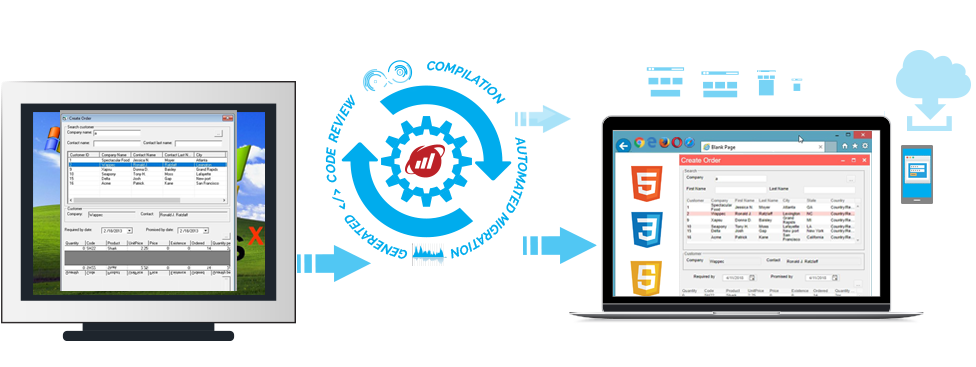
GAP AI Migrator automates the migration of .NET Windows Forms applications from desktop to a modern web architecture, using industry standards like ASP.NET Core, Angular, HTML5, CSS, and more. GAP AI Migrator is different from other tools because it creates high quality native HTML5/Angular code, without any use of binaries, runtimes, or browser plugins. As opposed to a manual rewrite, GAP AI Migrator gives customers a jumpstart on a new platform by providing a new fully functional app that can be tuned and extended to take advantage of new features.
With version 5.0, GAP AI Migrator brings big improvements in code readability, app performance, and automation. You can learn more starting here.
GAP AI Migrator migrates Winforms/.NET source code (either C# or VB.NET) from a client-server architecture to a new code base that is architected to be a modern web application. After migration the source code must be compiled, debugged, and deployed on a web server. Because GAP AI Migrator uses automation to transform code, fewer defects are created compared to a manual rewrite. You get a new code base, completely readable and maintainable, using state-of-the art languages, frameworks, and patterns without introducing defects in your business logic. GAP AI Migrator can shave up to 80 percent of the time and cost needed to "webify" a Windows desktop application.
There are many advantages to moving captive desktop apps to a web architecture. Users can run the app on any browser (so virtually any hardware platform). Deployment is simpler, quicker, and cheaper. You can host from public, private, or hybrid cloud. You can implement DevOps, continuous improvement and continuous delivery (CI/CD), and application health monitoring. Rewriting desktop apps into web apps is risky, time consuming, and expensive. GAP AI Migrator changes the calculus to make it possible.
No. GAP AI Migrator builds a rich architecture for your application using modern patterns and technologies like ASP.NET Core on the server side, Angular with Progress Kendo for Angular on the client side, with JSON, CSS, AJAX, and more. Some desktop operating system capabilities may not be supportable on a web application (printing, local storage, hardware access, etc). Some manual changes are inevitable when moving from desktop to web; our engineering team will be happy to consult with you on the extent of your needed changes and how to best effect them.
The assessment tool will tell you how ready your code is to migrate without the need to upload any code. Download the assessment wizard to analyze your desktop source code to find out how ready it is to migrate to cloud native.

GAP AI Migrator relies on contemporary tools like Visual Studio (Community or Enterprise Edition) and Visual Studio Code, as well as many nuget packages. Full instructions are provided with your license.
The architecture of the resulting app uses ASP.NET Core or Apache Tomcat as a server, with an Angular front end (HTML plus CSS). We currently use Progress Kendo for Angular for client UI controls. Communication between client and server is JSON and WebAPI.
Yes, currently GAP AI Migrator uses Angular with Progress Kendo for Angular; note this is a licensed product and if you use it beyond the trial or evaluation stage you will need to purchase a license.
When you start a migration you have to choose which framework you would like to target.
Many Microsoft and some third party controls are supported. When your run our assessment tool, we can tell you what can and cannot be mapped. Customizations are available to map patterns and controls that are unique to your code.
GAP AI Migrator fully supports C# 6.
GAP AI Migrator does not create a responsive app. Responsive interfaces are usually not a good fit for most desktop apps once they are migrated to the web. However, since the client is pure Angular with HTML and CSS, it's possible to build responsiveness into the client code.
The resulting application is “functionally equivalent” to the original application. That means that it will look and act the same as the originating application. Since layout is controlled by cascading style sheets (CSS) you can immediately make modifications to how the app looks on different form factors.
GAP AI Migrator can handle converting C#/Winforms, VB.NET/Winforms, and PowerBuilder.
Yes, we use ASP.NET Core so it can be hosted on Apache Tomcat or IIS.
Desktop infrastructure and web/cloud infrastructure have some fundamental differences and functional gaps. However, we automate as much as possible while providing high quality, maintainable code.
Yes, by using our migration services since the change from your existing authentication/authorization mechanism will have to be custom.
A Web application has a different user paradigm than a desktop app--among other differences, it has to share memory and processor resources with every other session; on a desktop normally the execution thread is supporting only one session. Additionally, the client and back end logic must communicate over a network of indeterminate performance; this can introduce latency in response. Our architecture is designed to make the Web app work as efficiently as possible but tuning may be required to get the best performance.
We have several options here. We can have an OCX/applet or a client app that allows the web app to interact with devices or we can provide a web based solution or in some cases these devices can be connected to a shared server. There are workarounds that vary from app to app.
We are still analyzing the best options for automating the migration. Meanwhile we provide upon request guidance and examples for manually changing your code and we can quote for a migration customization for your particular needs. If your application just uses the Office APIs to read and/or write Office documents, then you can replace the Office APIs by libraries like:
If you need app interaction that might require moving code to the client and using an extension like an OCX, Browser Extension or applet in order to provide communication between browser, Office, and server, we can provide examples of these techniques upon request.
Yes, by default GAP AI Migrator generates a solution based on ASP.NET Core, targeting the .NET Framework 4.5
Please fill-out our talk to an engineer form if you have any technical questions. We'll set up a technical call and clear any doubts you might have.
The trial and assessment are free; an actual migration cost depends on the size of your app. You can find more information HERE.
We use the assessment tool to measure the different PME (properties, methods and events) used by the application and collect some other statistics. We then use that to compare with our tables of currently supported PMEs and features, and we estimate the amount of work to add the missing elements or solve other important challenges detected during assessment. That provides a ballpark number.
The goal of the project is a functionally equivalent version of your current application but moved to the new platform and architecture. The standard methodology assumes our clients deliver us a set of test cases along with the source code of the application that we will migrate. Tests which run on the current app will pass on the new app; however, in the cases where the specific test doesn’t map exactly to HTML (for example, the test assumes the app is connected to a local hardware device), new replacement tests must be devised. Our QA department will run whatever test suites you give us.
Certainly. We have to do some basic validation after building the app that it runs, but you can have your own QA department handle most of the work and log bugs in our database. Also, we have different engagement models where we can do just basic testing on the application or where we can execute the full set of test cases. Your QA team involvement will depend on the engagement model we define for the project.
Yes, we work with this situation frequently. We can put engineers on site at your facility, and also we can use a VPN to access your code on your source control system.
It definitely gives them benefits. End users get easier installation as well as the major benefit of mobility. They will be able to access the system from their preferred browser and even from their tablet or phone.
Yes. As migration experts we are already used to that reality and the Migration Blueprint will establish how, when, and how often we will integrate application changes and any other steps.
We will happily keep your new app current for you. Please contact us at info@wearegap.com for more information.
Yes, we can provide web hosting, IaaS, etc. with major cloud vendors so you don’t have to worry about hardware, uptime, deployment, or support.
HTML5 makes it possible to move most native functionality to a native web application, easily deployed in the cloud.