



by Rocío Villegas Jiménez, on Nov 18, 2026, 12:15:00 AM
What the Assessment Measures and What Comes Back
Today at VSLive! Orlando we opened the VELO self-serve preview. The announcement covers what the preview is and how to get in. This post is for the people who will actually upload code: what VELO measures, what it hands back, and which parts still need a person.
To keep it concrete, we ran one application from start to finish. sks-inventory-sample is a small VB6 inventory and ordering system: 18 forms, three .bas modules, one .vbp, and the ActiveX controls you would expect from an app of that era (MSFlexGrid, ListView, the ADO data control, Common Dialog, a masked edit box and a chart control). We picked something small on purpose, so every number below can be checked against the reports. All of them come straight from the two reports VELO produced.
The preview flow
- Sign in with your Microsoft account (Entra ID) and upload your source.
- VELO runs a free assessment and produces an assessment report with an Executive view and an Engineer view.
- If you want to go ahead, you get a fixed-price quote from GAPVelocity AI.
- Once the quote is signed, you run the modernization on the platform. VELO builds the new solution and evaluates it, producing a second report on what was generated, whether it compiles, and what still needs review.
In this preview, VB6, PowerBuilder and Microsoft Access applications move to Blazor on .NET for Azure.
Step 1: The assessment
The assessment reads everything you upload and sorts it before it estimates anything. That sorting is where most legacy estimates go wrong.
Lines of code counted
The headline figure for the sample is 8,493 lines. The breakdown tells a different story:
|
Category |
Lines |
Share |
|---|---|---|
|
Executable code |
2,913 |
34.3% |
|
UI layout |
4,890 |
57.6% |
|
Empty / blank |
517 |
6.1% |
|
Commented-out |
173 |
2.0% |
|
Total |
8,493 |
100% |
More than half the file content is form layout: the property blocks at the top of every .frm that describe where each control sits. That layout does not get translated line by line. It gets regenerated as Razor components. The real logic in this app is about 2,900 lines, which is why the report treats the total as a ceiling, not as the size of the job. If you have ever priced a VB6 migration off a raw line count, this table shows how far off it can be.
Coverage
Coverage tells you how much of the estimate rests on code VELO could actually read. For the sample it was 22 of 22 files readable as text, with zero binaries and zero unknown file types. In a real codebase, compiled files such as DLLs, OCXs and PowerBuilder PBLs show up as "identified binary". VELO knows they exist but cannot count their lines, so a lower coverage score means the estimate carries more uncertainty. Upload the full project folder, not a curated subset, and that number stays honest.
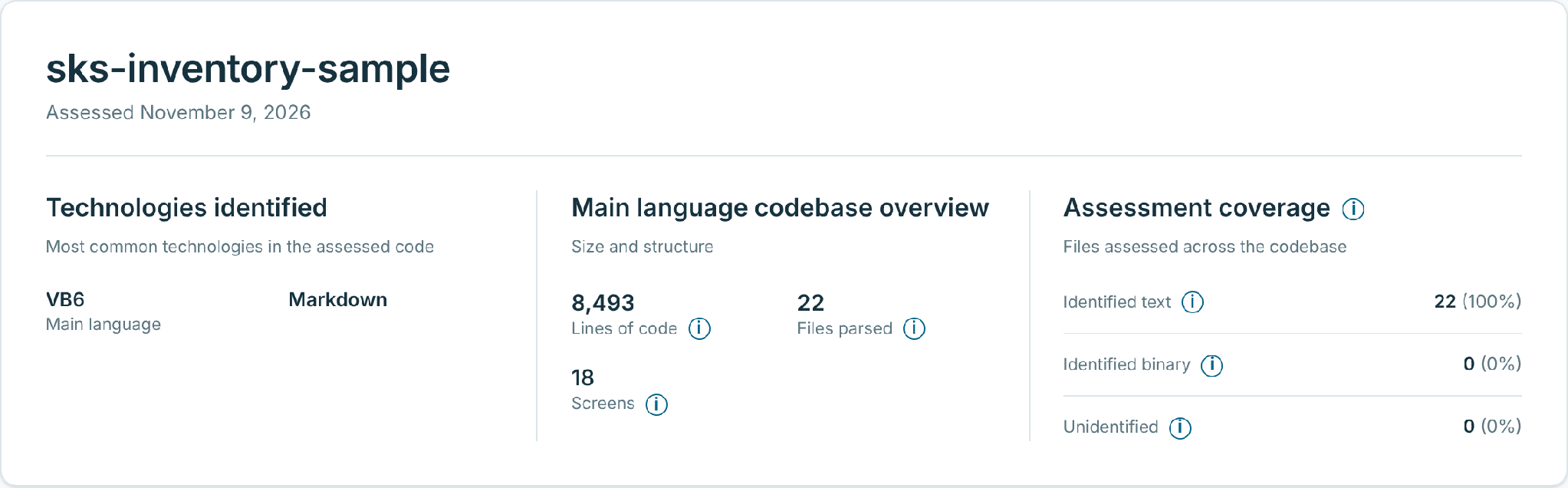
Figure 1. The assessment header. 8,493 lines across 22 files and 18 screens, with every file readable, so the estimate rests on measured code.
Conversion risk per component
Every form and module gets a conversion-risk rating based on object type, size and specific content signals: Win32 API calls, late-bound COM, Shell calls, data-access patterns and suppressed error handling (yes, On Error Resume Next). For the sample, 11 forms rated Medium and the remaining forms and all three modules rated Low. The highest-risk item was frmOrderRequest.frm at 376 lines.
The rating measures how much effort it takes to move a component to the web stack. It says nothing about how buggy the component is today. That distinction matters when you read the list: a Medium form is one that will need design decisions, such as business logic embedded in event handlers, not one that is broken.
Third-party components
The sample references 13 non-native components: nine OCX controls and four DLL or type-library references. Each one is listed by name and flagged for review, because each needs a decision about what replaces it.
|
Component |
Type |
Typical role in a VB6 app |
|---|---|---|
|
MSFLXGRD.OCX |
ActiveX control |
Editable data grids |
|
MSCOMCTL.OCX |
ActiveX control |
ListView, StatusBar, ImageList |
|
MSCOMCT2.OCX |
ActiveX control |
Date pickers, up-down controls |
|
MSDATGRD.OCX, MSDATLST.OCX |
ActiveX controls |
Bound data grid and lists |
|
MSADODC.OCX |
ActiveX control |
ADO data control |
|
MSMASK32.OCX |
ActiveX control |
Masked input |
|
COMDLG32.OCX |
ActiveX control |
Open/save/print dialogs |
|
MSCHRT20.OCX |
ActiveX control |
Charts |
|
msado25.tlb, msbind.dll, msstdfmt.dll, stdole2.tlb |
Type libraries / DLLs |
ADO, data binding, formatting, OLE automation |
Two readers, one report
The assessment comes in two views. The Executive view is written for whoever owns the budget: a summary, what inaction could mean across customer trust, service continuity and cost of change, a risk table, and a recommended approach. For the sample, it recommended an incremental, module-by-module move to Blazor Server, so each module can be verified before the next one moves. The Engineer view has the detail above, plus file explorer, project composition and an API summary. Both views export as standalone HTML files you can send to the people who need them. The estimate behind the fixed-price quote is in the report too; we have left it out here.
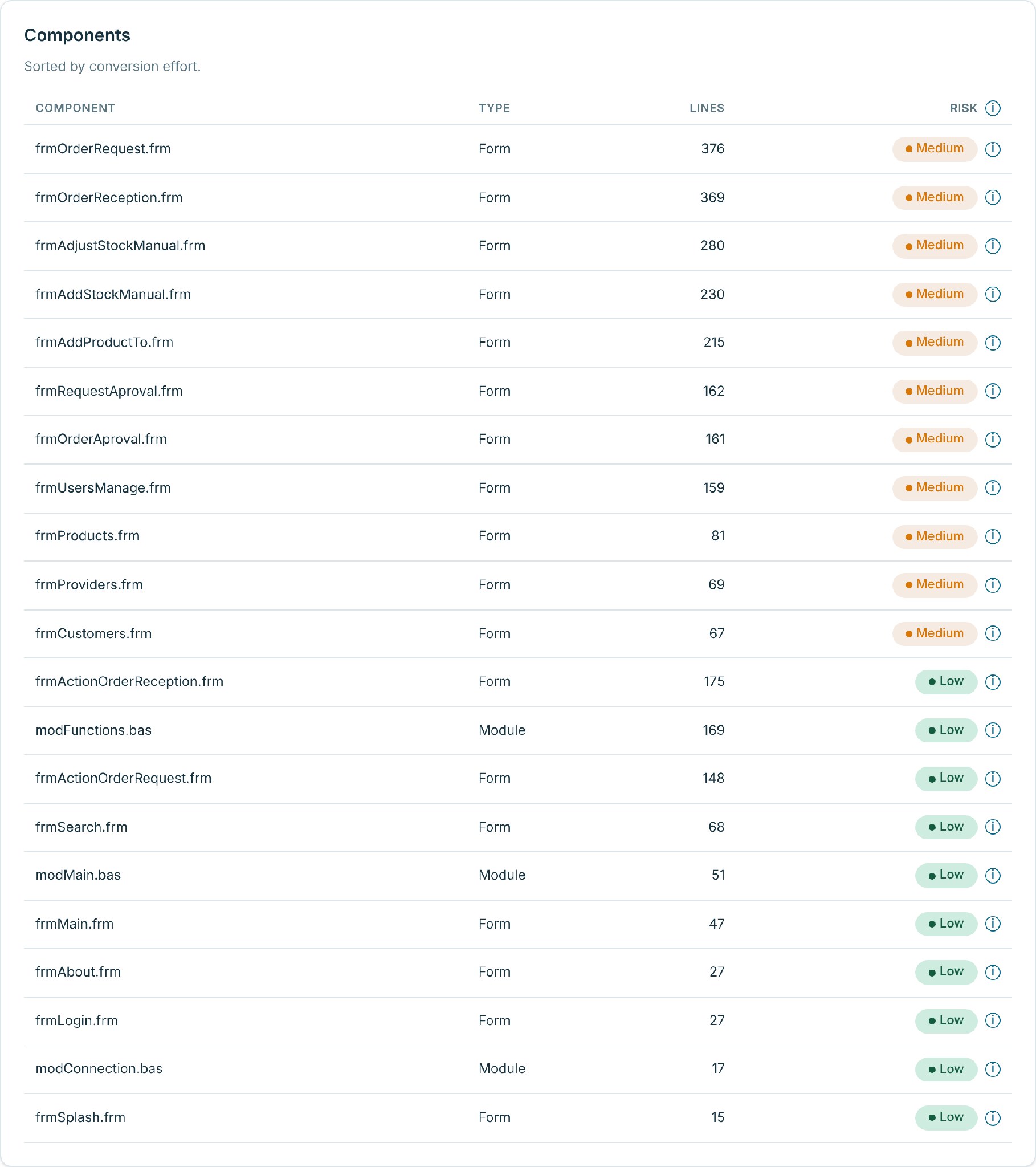
Figure 2. Conversion risk per component. 11 of 18 forms rate Medium, led by frmOrderRequest.frm at 376 lines; all three modules rate Low.
Step 2: What VELO generated
After the modernization run, VELO evaluates its own output and produces a second report. Here is the header for the sample:
|
Area |
Original |
Modernized |
|---|---|---|
|
Language and platform |
Visual Basic 6 |
Blazor Server, .NET 10 |
|
User interface |
VB6 forms |
MudBlazor pages and dialogs |
|
Data access |
ODBC |
Entity Framework Core, SQLite in this run |
|
Code units |
22 objects |
459 generated files |
|
Packaging |
.vbp project |
.sln solution |
|
Build state |
Compiles |
|
|
Modernized objects |
90.5% (19 of 21) |
|
|
Review items |
12 |
Layers, not a transliteration
VELO does not produce a C# copy of each form with the old event handlers pasted into code-behind. It separates what the screens show from what the business does, and generates a layered .NET solution:
 SKS.sln
src/
  Presentation/SKS.Presentation      Razor pages, dialogs, layouts (MudBlazor)
  Application/SKS.Application        commands, queries, handlers, DTOs, validators
  Common/SKS.Common                  base entities, domain events, Result type
  Domain/SKS.Domain                  entities, value objects, domain services
  Infrastructure/SKS.Infrastructure  EF Core DbContext, entity mappings, repositories
  CrossCutting/SKS.CrossCutting      identity, authorization, dialogs, security headers
tests/
  SKS.Application.Tests
  SKS.Domain.Tests
  SKS.Infrastructure.Tests
|
Responsibility |
Files |
|
|---|---|---|
|
Presentation |
Screens and components users see and interact with |
62 |
|
Application |
Use cases and workflows triggered by user requests |
192 |
|
Business domain |
Business entities and rules, independent of screens |
50 |
|
Infrastructure |
Database, file and external-system access |
24 |
|
Shared services |
Logging, security and configuration |
11 |
|
Automated tests |
Unit and integration tests for the generated code |
117 |
|
Other |
Solution file, .editorconfig, .gitignore |
3 |
The application layer uses a command/query split: every write is a command with its own handler and interface, every read is a query with its own handler. Domain services hold the rules that used to live in event handlers, and domain events connect them.
Following one form through
frmOrderRequest.frm, the highest-risk form in the assessment, shows how this works. In VB6 it was one form with its logic in event handlers and calls into a shared helper module. In the generated solution it becomes:
- Pages/OrderRequestManagement/OrderRequestPage.razor: the screen
- PlaceOrderRequestCommand and its handler: placing the order
- ApplyOrderRequestLineEditQuery and SearchCustomersQuery: the line editing and customer lookup the form did inline
- OrderRequestDetail: a domain entity for the order lines
- ProductReservationService and OrderRequestTotalsService: the reservation and totals rules, as domain services
- OrderRequestPlacedEventHandler: what happens after an order is placed
The shared helper module, modFunctions.bas, is the other interesting case. A 169-line grab-bag of functions shows up as a source for more than 20 generated files, from stock-adjustment commands to totals services. Its functions moved to wherever they were used, rather than becoming a new Helpers class.
Traceability
Every generated file records which original object or objects it came from. In the Presentation layer, 37 of 62 files trace back to a VB6 form; in Application, 90 of 192; in Domain, 22 of 50. The rest, including all of Infrastructure, the shared services and the tests, are new scaffolding with no VB6 counterpart, and the report says so. When a reviewer asks where a handler came from, the answer is in the file explorer, not in someone’s memory.
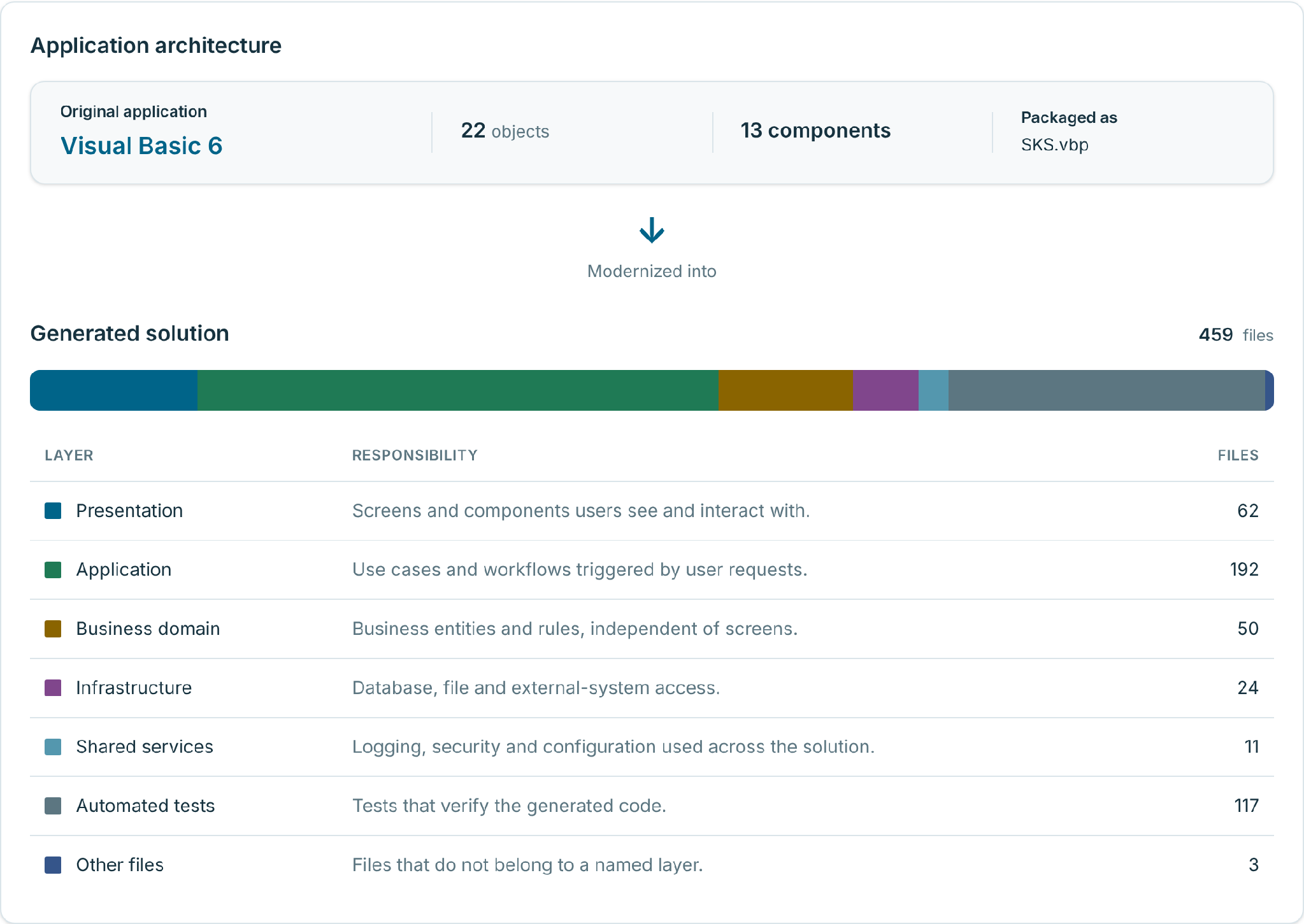
Figure 3. From one VB6 project to a 459-file layered .NET solution. Application logic is the largest layer; tests are the second largest.
Tests
The solution ships with 117 test files: unit tests for the command and query handlers, unit tests for domain entities, value objects and services, integration tests for each EF Core repository, and builders for test data. VELO also identified 69 business rules in the original app, such as "Last remaining user cannot be deleted" and "New username must be unique". Those numbers lead straight into the next section.
Step 3: The review items
"Compiles" means the build succeeds. Whether every screen behaves like the original is a separate question, and the review list is where VELO answers it. The sample came back with 12 items, each marked Needs attention, To review or By design:
|
Status |
Item |
What it means |
|---|---|---|
|
Needs attention |
37 of 69 business rules have no covering test |
The rule was carried over; nothing proves it yet. Includes the login credential check and a hardcoded administrator session in modMain.bas. |
|
Needs attention |
33 automated tests not written yet |
Planned tests still to be filled in. |
|
Needs attention |
Read-only MSFlexGrid has no direct MudBlazor equivalent (4 forms) |
MudTable has no current-column concept, so only row selection is reproduced. |
|
Needs attention |
Editable MSFlexGrid has no direct MudBlazor equivalent (2 forms) |
Only row selection and the single editable column are reproduced. |
|
Needs attention |
One security setting depends on the hosting environment |
A decision for whoever deploys it. |
|
Needs attention |
No reporting library chosen |
Report output needs a library decision. |
|
To review |
StatusBar has only a partial equivalent (10 forms) |
Confirm single-row status text is fine, or ask for a three-panel layout. |
|
To review |
ListView has only a partial equivalent (6 forms) |
Confirm column order and labels match the original. |
|
To review |
MSFlexGrid floating editor replaced with in-place numeric input (2 forms) |
Confirm the new input pattern is acceptable. |
|
To review |
7 files still to be completed |
Unfinished generated files, including the EF Core repositories. |
|
To review |
No recorded outcome for modConnection.bas and modMain.bas |
Nothing in the new solution names them, so whether they came across is unknown until someone checks. |
|
By design |
OfrmAccountProfile.frm left out |
Excluded on purpose. |
We publish this list in full because it is the useful part. A modernization tool that reports only successes hands the hard 10% to your team without warning. VELO tells you which grid behaviors changed, which rules are untested, which files are unfinished, and which two modules it could not account for. That is the work list for the last mile, and it is the same list whether your own team finishes the job or GAPVelocity AI’s AI Squad does.
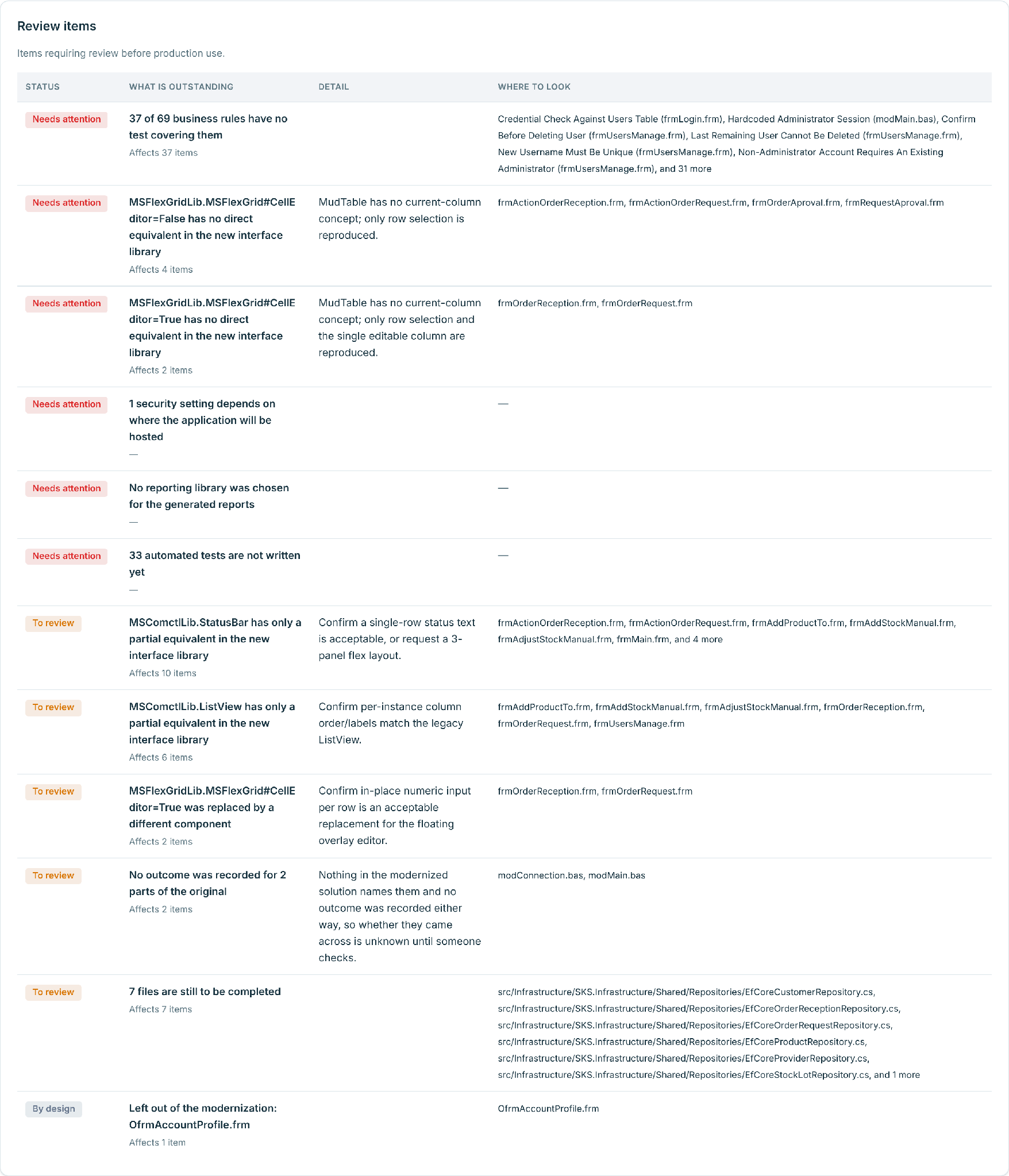
Figure 4. All 12 review items, as VELO reports them. Each one names the affected forms, modules or files.
Where your code goes
Uploading production source to a cloud service is a fair thing to be cautious about. The short version, from the VELO Trust Center:
- Sign-in is through Microsoft Entra ID. Traffic enters through Azure Front Door, with a web application firewall, rate limiting and DDoS protection; the VELO API and databases are not exposed directly to the internet.
- Uploads land in isolated Blob Storage and are malware-scanned before they move to processing storage. Each customer gets a company workspace, and users see only their own company’s projects. Note: this workspace is for building purposes only. At this time we’re not offering app hosting.
- Data is encrypted in transit and at rest, secrets and keys live in Azure Key Vault, and databases and messaging sit behind private endpoints.
- VELO’s agents run on models in VELO’s own Microsoft Foundry resources.
- Under the VELO terms, you keep ownership of both the uploaded and the modernized code, your code is never used to train any AI model, and it is deleted within 60 days of termination or a written request.
One practical tip: strip credentials and connection strings before you upload. The malware scan protects the service; it is not a security review of your application.
Why this shape of output
The team behind VELO has been building migration tools for more than 35 years, starting with the technology behind the Visual Basic Upgrade Wizard that shipped in Visual Studio. Across billions of lines of code and thousands of projects, one lesson keeps repeating: the assessment that matters is the one that tells you what is left. VELO’s reports are built around that lesson. They count what can be measured, flag what cannot, trace every generated file to its source, and put the remaining work in a list you can assign.
Try it on your own code
- Who: teams with VB6, PowerBuilder or Microsoft Access applications. We are admitting teams in weekly waves, and each team gets a free assessment.
- How: apply at gapvelocity.ai/velo.
- Watch it first: Jeff Fritz demos the preview live from VSLive! with Kenneth Rivera, VP of Engineering at GAPVelocity AI, at 10:00 a.m. ET on November 18 at twitch.tv/csharpfritz and youtube.com/@csharpfritz.
- Before you upload: send the whole project folder, not exported snippets, and remove credentials.
General availability is planned for early 2027. Bring the app nobody wants to touch.
FAQ
What does the VELO assessment measure?
File and line counts split into executable code, UI layout, comments and blanks; how much of the codebase was readable; a conversion-risk rating per form and module; every third-party component; and a recommended migration approach. It also produces the estimate behind your fixed-price quote.
What does VELO generate from a VB6 application?
A layered .NET 10 solution with Blazor Server and MudBlazor for the UI, Entity Framework Core for data access, separate application, domain, infrastructure and shared-services projects, and unit and integration test projects. Every generated file is traced to the original objects it came from.
Does "Compiles" mean the application is ready for production?
No. It means the solution builds. The review items list what still needs a decision, a test or a finished file before the app goes live, and the VELO terms require your team to review and test modernized code before deployment.
Is my code used to train AI models?
No. Under the VELO terms your code is siloed, never used to train any AI model, and deleted within 60 days of termination or a written request.

