



by Oscar Poveda, on Oct 29, 2026, 8:59:57 AM
Every legacy migration assumes that somewhere there is a database you can point the new application at. On several recent projects that assumption failed. We received the source code, a request to modernize it, and nothing else: no database backup, no DDL, no access to the production schema. The code migration itself can proceed without the database. Testing cannot. A modernized application with no data behind it renders empty grids and throws on the first query, and there is no way to show the customer that anything works.
Before generative AI, the fallback was to rebuild the schema by hand, reading every file and transcribing every table and column the code touched. For a codebase of a few hundred files that was effectively off the table. This article explains why the database so often goes missing, and then lays out the pipeline we use to infer a working schema from the code alone and stand up a test database the modernized application can run against. The examples come from VB6, PowerBuilder and Clarion codebases. The short version of why it matters: the migration can be tested before delivery, the project stops waiting on the customer and no production data has to leave the customer's network.
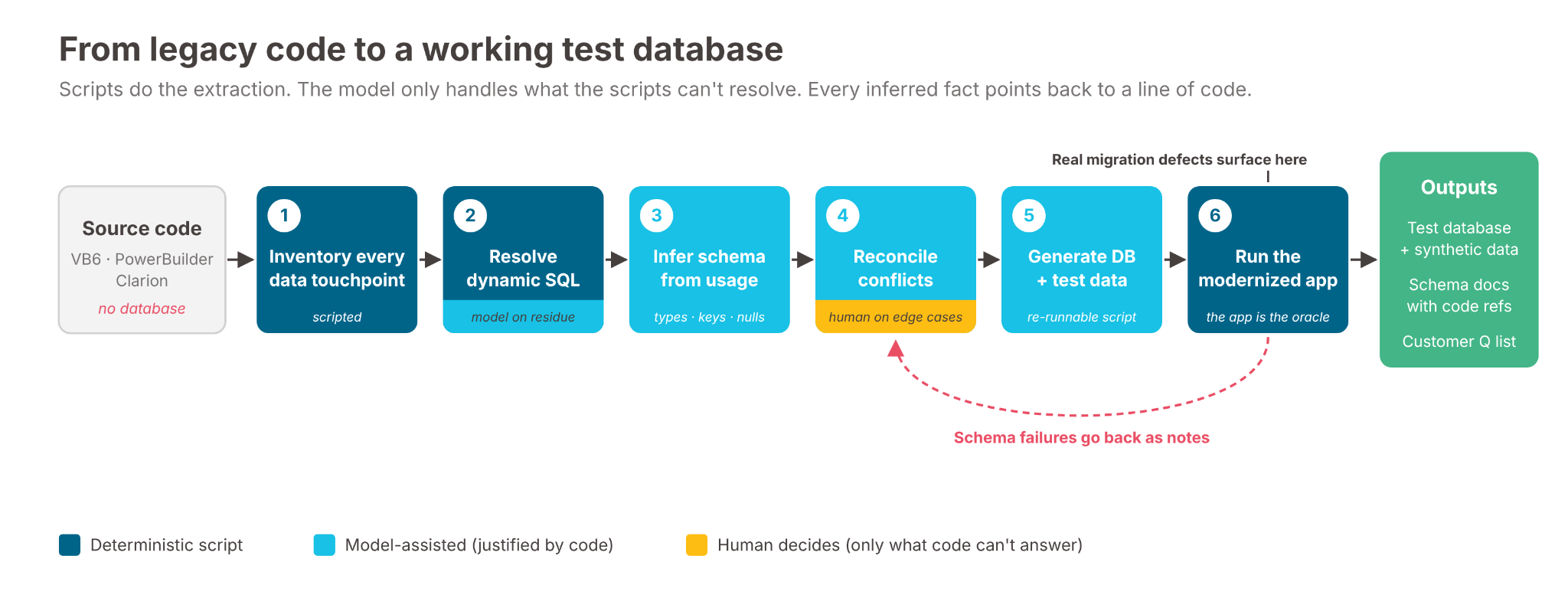
Figure 1. The pipeline. Scripts handle extraction; the model only sees what the scripts can't resolve; the running application feeds schema failures back into reconciliation.
Why the database isn't in the package
The reasons are mundane. The database is in production and the customer's DBA will not export it. The data is regulated and cannot leave the customer's network. The original vendor kept the schema and the relationship ended badly. Or, most commonly, nobody on the customer side knows where the schema lives anymore; the application has been running for fifteen years and the people who built it are gone.
What the customer does have is the code, and legacy code is unusually explicit about its data layer. VB6 applications build SQL strings by concatenation. Clarion declares file structures inline with every field and key. PowerBuilder DataWindows embed the full SELECT with column lists. The schema is not lost; it is scattered across the codebase in a form no single person can read end to end. The problem is extraction, not discovery.
Step 1: Inventory every data-access touchpoint
The first step is deterministic and should be fully scripted. Walk the codebase and record every place the code talks to a data store. The categories differ per stack, but the pattern is the same:
- Embedded SQL strings. SELECT, INSERT, UPDATE, DELETE and stored procedure calls, including the ones assembled from fragments across several lines or several functions.
- Declarative structures. Clarion FILE declarations, PowerBuilder DataWindow SQL, VB6 recordset field access (rs!CustomerName, rs.Fields("Balance")).
- Connection and provider metadata. Connection strings, driver names, database names. These tell you the target dialect (Access, SQL Server, Btrieve, TopSpeed, Oracle) and therefore which types and syntax to generate.
- Stored procedure and view references. These are the hardest, because the body lives on the server you don't have. Record the name, the parameters passed and the columns read back.
The output is a flat inventory: file, line, statement type, tables referenced, columns referenced, and the raw text. This step needs no model. A parser or even a disciplined set of regular expressions does it, and because it is deterministic it can be re-run every time the inventory rules change.
Step 2: Resolve dynamic SQL
Concatenated SQL is where a purely static approach stops. A VB6 function that builds "SELECT * FROM " & tableName & " WHERE " & filter tells you nothing until you know what tableName and filter can be. Three techniques cover most cases:
- Constant propagation within the function. If the variables are assigned literals in the same scope, substitute them. This is mechanical.
- Call-site expansion. If the fragment comes in as a parameter, collect every call site and expand each one. Most legacy applications have a small number of distinct callers per helper.
- Model-assisted resolution for the remainder. For the fragments that survive both passes, hand the function and its call sites to a large language model (LLM) and ask for the set of concrete statements it can produce. This is bounded work with a checkable answer: each proposed statement can be traced back to a code path.
The point of ordering it this way is that the model only sees the residue.
Step 3: Infer the schema from usage
With a resolved inventory, the schema falls out of the statements. Tables come from FROM, JOIN, INSERT INTO and UPDATE targets. Columns come from select lists, WHERE clauses, SET clauses and recordset field accesses. The interesting work is in the details the statements only imply:
- Types. A column compared to a quoted literal is text; one compared to a bare number is numeric; one passed through Format(x, "dd/mm/yyyy") or CDate is a date. Where the consuming code assigns the value to a typed variable, that type wins. Where nothing constrains it, default to a wide type (NVARCHAR(255), DECIMAL(18,4)) and flag it.
- Keys. A column that appears in most lookups on a table and in every JOIN condition to it is very likely the primary key; Step 4 catches the exceptions. . A column named like another table's key, used in a join, is a foreign key. Clarion keys and PowerBuilder update properties make this explicit; VB6 does not.
- Nullability. IsNull(rs!Field) checks, Nz() wrappers in Access/VBA code, and homegrown null helpers in VB6 mark a column nullable. The absence of a check is weaker evidence, so treat columns as nullable unless an INSERT always supplies them.
- mark a column nullable. The absence of a check is weaker evidence, so treat columns as nullable unless an INSERT always supplies them.
- Widths. Left(x, 50) before an insert, a text box MaxLength, or STRING(n) declaration or @S picture in Clarion give you lengths. Everything else gets the wide default.
This is the step where the model earns its place. Rule-based inference handles the common cases, but every codebase has a long tail of idioms, and writing a rule for each one costs more than asking the model to classify the usage and produce a justified type. The model's output is a proposed DDL per table with a confidence note per column and a pointer back to the code that justified it. Nothing in it is accepted without that pointer.
Here is what that looks like on a single function. The code:
' frmCustomer.frm (illustrative)
Private Sub LoadCustomer(ByVal custId As Long)
sql = "SELECT CustName, Status, CreditLimit, LastOrder " & _
"FROM Customers WHERE CustID = " & custId
Set rs = db.OpenRecordset(sql)
txtName.Text = rs!CustName ' txtName.MaxLength = 40
If rs!Status = "A" Then lblActive.Visible = True
If Not IsNull(rs!LastOrder) Then _
txtLast.Text = Format(rs!LastOrder, "mm/dd/yyyy")
End Sub
And the DDL the pipeline proposes from it, with a confidence level and a code reference on every column:
CREATE TABLE Customers (
CustID INT NOT NULL PRIMARY KEY, -- high: WHERE + join
CustName NVARCHAR(40) NULL, -- medium: MaxLength 40 (.frm:31)
Status CHAR(1) NULL, -- CONFLICT: 'A' vs 1 (modReports:140)
CreditLimit DECIMAL(18,4) NULL, -- low: no evidence; flagged
LastOrder DATETIME NULL -- high: IsNull + date Format (:218)
);[.
Step 4: Reconcile conflicts
The same column will be used inconsistently. One module compares Status to 'A', another to 1. One form writes a 30-character name; another reads it into a 50-character buffer. These conflicts are not noise; they are usually the most informative thing in the inventory, because they reveal either a real schema oddity or a latent bug in the original application.
Each conflict becomes a short note one observation, written against one column, describing a class of problem. Notes go to the model in batches with the instruction to resolve each one against the full inventory and apply the resolution consistently. The human decides when the answer is not derivable from code (ask the customer whether Status is a char or an int). Everything else the model settles with a traceable reason.
Step 5: Generate the database and the data
Once the DDL stabilizes, generate the database in the target engine (SQL Server, PostgreSQL, etc) and populate it. Empty tables are not enough; the modernized application needs rows that exercise joins, filters and reports.
The inventory already tells you what the data has to look like. Every WHERE Status = 'A' means some rows need Status = 'A'. Every join means referential integrity has to hold. Every date filter means dates spread across a plausible range. We feed the DDL plus the extracted predicates to the model and ask for a data generator. The script is deterministic and re-runnable, so when the schema changes the data regenerates with it.
Stored procedures and views are reconstructed the same way, from the parameters passed and the columns read back. These are the least certain artifacts in the whole output and are marked as such. They are good enough to make the application run; they are not a substitute for the real ones when the customer eventually produces them.
Step 6: Run the modernized application against it
The inferred database exists to be tested against. Run the modernized application, open every screen, run every report. Failures sort into two groups:
- The schema is wrong. A missing column, a wrong type, a key the code expected. Each failure is a note; notes go back to Step 4. The inferred schema converges quickly because the application is the oracle.
- The migration is wrong. The schema is right and the modernized code still fails. This is the finding the customer actually paid for, and it was invisible until the database existed.
Design principles
Deterministic extraction, probabilistic inference. Inventorying statements and resolving constants is rule-based and re-runnable. The model is used for the long tail of idioms and for conflict resolution, where the answer requires judgment over the whole corpus.
Every inferred fact points at code. A column type without a line number is a guess. The model's output is only accepted in a form that can be checked against the source, which also makes it reviewable by someone who was not in the loop.
The application is the test. The inferred schema does not need to match the production schema; it needs to make the modernized application run correctly. Those are different standards, and the second one is reachable without the customer's cooperation.And when the real database does turn up, diffing it against the inferred schema becomes a validation step in its own right
Flag what cannot be derived. Some questions have no answer in the code. Collect them as a short list for the customer instead of guessing silently. In our experience the list is a few dozen items, and a customer who could not produce a database can usually answer a few dozen questions.
What inferring the database buys you
The immediate benefit is the obvious one: the migration can be tested. Without a database, a modernized application is a compiled artifact with no evidence that it works. With an inferred one, every screen, query and report can be exercised, defects in the migration surface before delivery rather than after, and the customer sees a running system instead of a promise.
The second benefit is that the project stops being blocked on the customer. On the projects where this happened to us, waiting for a database export meant weeks of idle time and, in at least one case, a database that never arrived. The pipeline removes that dependency entirely. The code is the only input, and the code is the one thing a modernization customer always has. There is also a benefit for regulated customers. Because the test data is synthesized from the predicates in the code, no production data ever has to leave the customer's network. For healthcare, financial services and public sector clients, that is often what decides whether the project can start at all.
The third is that the schema becomes documentation. Most legacy applications have no up-to-date data model. The inferred DDL, with a code reference per column, is often the first complete description of the data layer the customer has had in years, and it travels with the modernized code as a maintained artifact rather than tribal knowledge. The list of unresolved questions is itself useful: it tells the customer exactly which parts of their own system nobody understands anymore.
The fourth is that the process exposes latent defects in the original application. Type conflicts, inconsistent widths and columns written but never read are real findings about the legacy system, and they would have stayed hidden if the migration had simply been pointed at a production database that tolerates them.
Finally, the work is repeatable. The inventory, resolution and generation steps are scripts; the inference and reconciliation steps are prompts over structured input. What took a person an impractical number of days reading files one at a time now takes hours per codebase, and the second codebase costs much less than the first because the tooling already exists. Reconstructing a database used to be a reason to decline a project. Now it is a stage in the pipeline.
Sitting on a VB6, PowerBuilder or Clarion application and can't hand over the database? That's not a blocker anymore. Talk to us about a VELO assessment.

