



by Oscar Poveda, on Aug 27, 2026, 10:28:48 AM
The first thing a client does when a modernization finishes is count the lines of code (LOC). Three thousand lines of PowerBuilder went in. Twenty-five thousand lines of React and ASP.NET Core came out. The reaction is always some version of the same question: what did you add, and why am I paying to maintain seven times more code?
It's a fair resting on a bad baseline. The legacy line count was never a measure of how simple the application was. It was a measure of how much the old language let you leave implicit, and how much logic you were willing to cram into a single file. Modernization doesn't inflate an application. It makes visible what was already there.
Your line count was low because nothing had a boundary
Legacy applications aren't monoliths in the polite sense of the word. A monolith can still have layers — a data access tier, a service tier, a UI tier — all shipped in one deployable. That's maintainable. What we actually receive is something denser than that.
In the codebases we modernize, backend logic and frontend logic live in the same file with no declared boundary between them. There is no answer to "where does data access happen" or "where are the UI components," because the answer is everywhere. A conversion routine is called inline and performs the conversion inline. A screen queries the database directly with a SELECT ... FROM customer written into the form.
That is extremely compact. It is also the definition of tight coupling, and it's the reason the line count was low.
The modernized version can't reproduce that, and shouldn't try. If it did, we'd be doing a migration — the same architecture in newer syntax — and the client would inherit the identical maintenance problem in a new language. The target is low coupling and high cohesion, and that costs lines.
The DataWindow was a compression algorithm
Nowhere is this clearer than the frontend.
A PowerBuilder application barely has a frontend in the modern sense. The DataWindow was a remarkably compact control: bind it, and it handled retrieval, presentation, editing and update in almost no code. Oracle Forms, Clarion templates and classic ASP each have their own version of this trick.
Rebuilding that same screen in React or Blazor, means writing the HTML, the component structure, the state handling and the explicit method calls to the services behind it. Nothing about that is bloat. The old platform was doing the work behind a proprietary control, so the lines never appeared in your repository. They existed. You just didn't own them — and you couldn't change them.
Where the new lines actually go
For a self-contained Blazor target, the resulting structure separates concerns the legacy app kept fused:
- Domain layer — the entities. Previously these were implicit in whatever the query returned.
- Infrastructure layer — data access and external concerns, isolated behind interfaces.
- Application layer — the DTOs and the services. The DTOs are the transport objects; the services own the database calls and connect to the entities.
- Models layer — the shapes the presentation tier actually consumes.
When the target is a split React frontend with an ASP.NET Core backend, the same layers are there and one more gets added: controllers. The backend now exposes and consumes APIs that PowerBuilder never had, because at the time the original app was written, the concept didn't apply. The frontend becomes its own project entirely, the API clients that consume the backend, and shared hubs rather than a folder-per-feature sprawl.
That extra layer is the whole reason the multipliers differ. A second application in the same portfolio went from 9,000 lines to 21,000 — roughly 2.3x. The PowerBuilder app went to 6.9x. Same methodology, same discipline. The difference is that one target is a single self-contained project and the other is two projects with a formal API contract between them.
In both cases the multiplier tracked the target architecture, not how much the platform padded the original code.
Case Study: Deconstructing 3,639 Lines into 25,076
To see how concern separation expands line counts in practice, consider a real-world inventory management module modernized from PowerBuilder to a split ASP.NET Core and React target.
In the legacy application, 3,639 lines were crammed into four flat .srw files (w_edit_stock_update.srw, w_edit_stock.srw, w_edit_stock_transfer.srw, and w_edit_stock_writeoff.srw). Controls, SQL scripts, event handlers, and connection settings were interleaved in single files with zero reusability.
Modernizing this screen into a decoupled, layered solution expanded the codebase to 25,076 lines (a 6.9x multiplier) across three distinct projects:
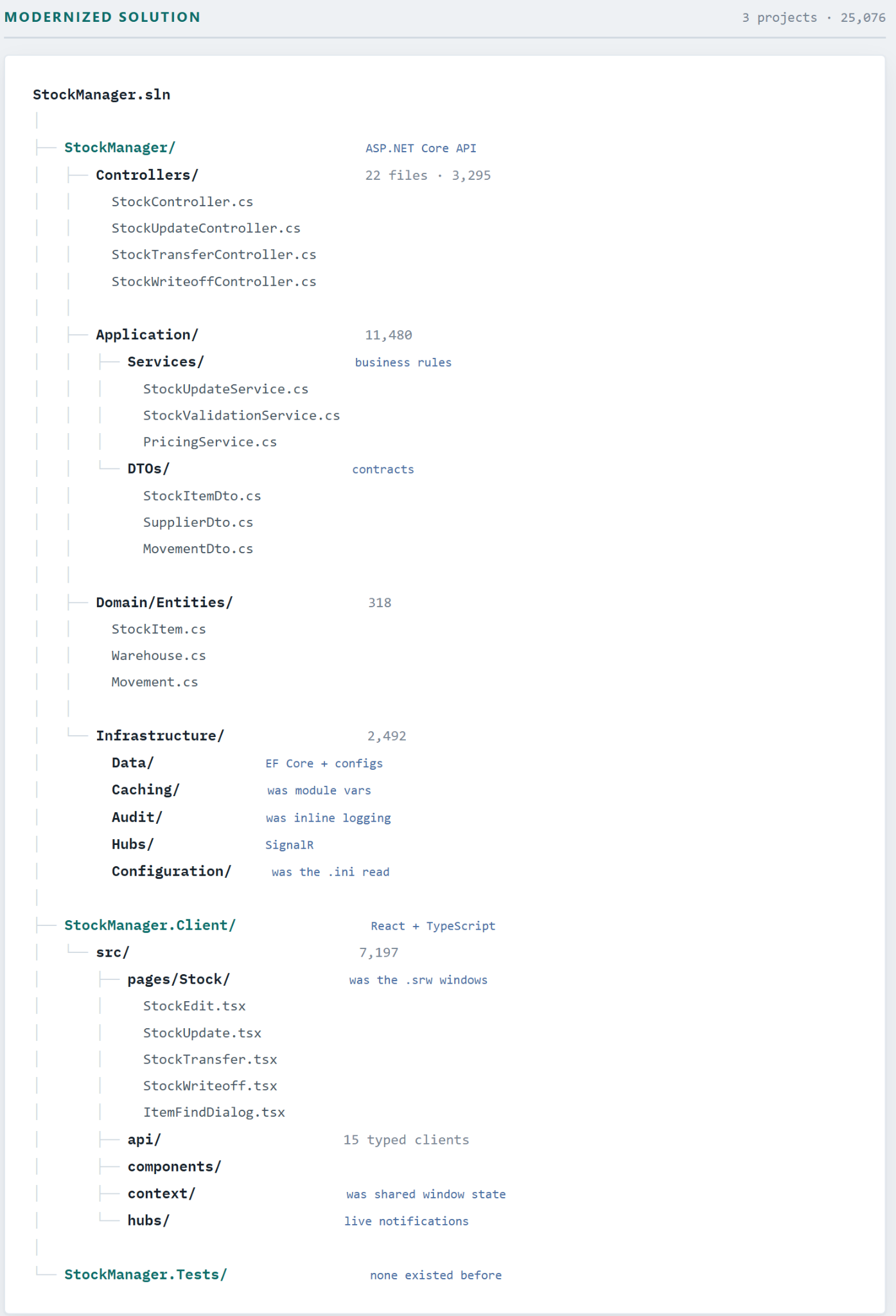
Where the Legacy Code Went
Reading left to right shows how each concern previously mixed inside the .srw files was extracted into its own dedicated tier:
|
Legacy PB Concern |
Modern Target Layer |
Modern LOC |
|
Window & Control Declarations (layout, tab order, visibility) |
Client/src/pages/Stock/ (React/TS) |
7,197 |
|
Event Scripts (clicked, itemchanged, retrieved) |
Controllers/ + API Clients |
3,295 |
|
Business Rules (validation, pricing, allocation) |
Application/Services/ rules + DTOs, interfaces, mappers(.NET) |
11,688 |
|
Embedded SQL (SELECT/UPDATE against DataWindow) |
Domain/Entities/ + Data/ (EF Core) |
2,819 |
|
Module-Level Variables (de-facto state cache) |
Infrastructure/Caching/ |
Included |
|
Connection & .ini Handling (hardcoded per window) |
Infrastructure/Configuration/ |
Included |
|
No Existing Tests |
StockManager.Tests/ |
Added |
The 11,688 lines in Application/Services aren’t 11,688 lines of business rules. That layer also holds . the interfaces, DTOs, typed API contracts, and explicit state management the .srw files never had to declare. Separation of concerns carries a line cost because the legacy language hid that architecture behind proprietary controls rather than saving you from writing it.
Some of those lines are things your legacy app should already have had
This is the part clients tend to appreciate once they see it in the diff.
Cross-cutting concerns get centralized. In the legacy app, logging, audit trail and exception handling are mixed directly into business logic, with several slightly different implementations of the same thing scattered across the codebase. The modernized version has one component that owns logging, and every other component invokes it. Consolidating that adds lines in one place while eliminating the duplicated variants everywhere else.
Hardcoded SQL becomes a service. In one application we modernized, the SQL queries were hardcoded throughout — string-concatenated, inline, unparameterized. Reproducing that pattern in a modern stack would have faithfully preserved a SQL injection surface across every new file. Instead the data access is extracted into a service that owns the connection and the query. That is a security fix that shows up on the line count as growth.
The ORM buys you independence. Traditional systems are tightly coupled to specific database engines. Introducing an ORM like Entity Framework adds an abstraction layer that enables modularity and database portability, though it inherently expands the codebase.
What you're actually buying
Line count is a cost. Here's the return.
Change becomes local. In PowerBuilder, adding one attribute to a customer table meant hunting down every SELECT ... FROM customer in the codebase and modifying each one. Miss one, and you've shipped a defect. In the modernized architecture, you change the service. Adding another table or another database means adding another service, not touching everything.
Deployment stops being a field operation. The legacy application was an executable that had to be placed on every machine. A web architecture containerizes cleanly, which makes CI/CD pipelines straightforward instead of ceremonial. It also runs on AWS or Azure without modification — the architecture is cloud agnostic by default.
Microservices become an option instead of a rewrite. Once the abstraction between layers exists, splitting individual services into their own deployables is a re-architecture decision you can make later, when a specific service grows enough to justify it. You aren't committing to it during modernization. You're simply no longer locked out of it.
You should be able to watch the line count grow
There's a version of this work that consists of handing a client a mapping table — here's construct A, here's its equivalent B, go do the rest yourself. That's not modernization, and it's exactly how teams end up at the finish line unsure what they're holding.
Our process builds a full model of what the application does — the mappings, the data flows, the dependencies — before anything is translated, and then executes in phases with a human in the loop at each one. You see phase one, phase two, phase three. You can course-correct mid-phase when an architectural decision turns out to be wrong for your context, rather than discovering it after everything has been generated. The final phase is adjustment, not archaeology.
That's also why the growth is explainable rather than mysterious. Every one of those 21,437 new lines maps back to something: a layer that didn't exist, a control that used to hide its own implementation, a security shortcut that got closed, or a dependency that got inverted.
A modernization that doesn't change your line count didn't change your architecture. It just changed your syntax highlighting.
Stop measuring modernization by line count. Engage our Forward Deployed Engineering team for a focused Proof of Concept. We will map a representative slice of your legacy codebase and deliver a working, modernized target-stack comparison — so you can see exactly which layers your new lines are going into, and decide whether Blazor or a split React and ASP.NET Core target is the right shape for your application, before you commit to a full-scale migration.

