

This in a Warning EWI. The tool in this case has upgraded the PopupMenu command but there is a different behavior and this warning is provided so the user is notified and can take actions if necessary.
In VB6 the PopupMenu has the following syntax:
object.PopupMenu menuname, flags, x, y, boldcommand
The boldcommand parameter is used to specify the name of a menu control in the pop-up menu to display its caption in bold text. If omitted, no controls in the pop-up menu appear in bold.
However, in .NET this parameter is not available.
VERSION 5.00
Begin VB.Form Form1
Caption = "Form1"
ClientHeight = 3015
ClientLeft = 225
ClientTop = 870
ClientWidth = 4560
LinkTopic = "Form1"
ScaleHeight = 3015
ScaleWidth = 4560
StartUpPosition = 3 'Windows Default
Begin VB.Menu mnuFile
Caption = "File"
Begin VB.Menu mnuNew
Caption = "New"
End
Begin VB.Menu mnuOpen
Caption = "Open"
End
Begin VB.Menu mnuClose
Caption = "Close"
End
End
End
Attribute VB_Name = "Form1"
Attribute VB_GlobalNameSpace = False
Attribute VB_Creatable = False
Attribute VB_PredeclaredId = True
Attribute VB_Exposed = False
Private Sub Form_Click()
Me.PopupMenu mnuFile, , 100, 100, mnuClose
End Sub
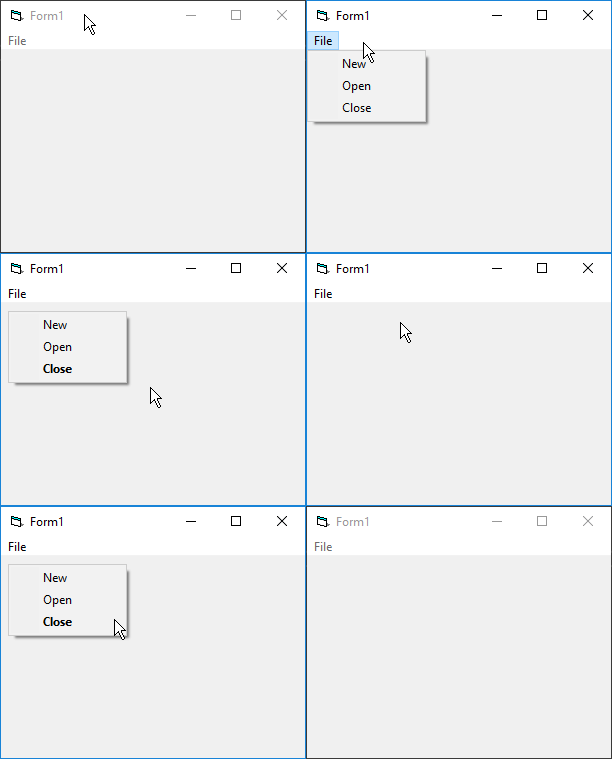
In the following image the VB6 program is shown. When the menu is selected from the File menu option, no menu options are highlighted. When the form is clicked the PopupMenu command is used to show the menu as a popup and the mnuClose option is shown in bold.
using System;
using System.Windows.Forms;
namespace Project1
{
internal partial class Form1 : System.Windows.Forms.Form
{
// Some code omitted
private void Form_Click(Object eventSender, EventArgs eventArgs)
{
//UPGRADE_WARNING: (6024) Default menues are not supported for Context Menues (Popup) More Information: https://www.mobilize.net/vbtonet/ewis/ewi6024
Ctx_mnuFile.Show(this, 7, 7);
}
[STAThread]
static void Main()
{
Application.Run(CreateInstance());
}
}
}
In the following image the .NET program is shown. When the menu is selected from the File menu option, no menu options are highlighted. When the form is clicked the Show method is used show the menu as a popup. However the mnuClose option is not shown in bold as this behavior is not supported in .NET.




