

The upgrade process will start by clicking the Upgrade Projects button from the tool bar or or just by pressing F5.

Note: The upgrade process has two major phases: preprocess and upgrade. When upgrading, the projects that need to be preprocessed will be preprocessed automatically, there is no need to perform Preprocess All command before starting an upgrade. Triggering phases individually can be useful for complex upgrade scenarios.
Once the Automated upgrade migration stage is complete the VB6 AI Migrator generates the following information:
The output folder will contain two subfolders:
An XML Spreadsheet with a report of source files per project and lines of code is automatically saved when the UpgradeSolution is saved.( SolutionName_LOC_Report.xml at the same location as the upgrade solution) This report can be viewed and modified using Microsoft Excel.
Report Example:
| Lines of code per project | LOC | ||||
| Project1\InterfacesDll.vbp | 15 | ||||
| Code | Comment | Blank | Design | ||
| \Class1.cls | 7 | 0 | 1 | 8 | |
| Project2\Project2.vbp | 22 | ||||
| Code | Comment | Blank | Design | ||
| \Class2.cls | 8 | 0 | 0 | 1 | |
| \Module1.bas | 6 | 0 | 0 | 0 | |
| Total lines of code: | 37 |
Next to the .vbp name are the lines of code of the project. This number is the one that will be reduced from the license when the project is upgraded.
Note: The design lines of a form are counted as lines of code of the project. For this reason, the number of lines you see on the Visual Basic 6 IDE may differ from the number on the report. To view all the lines of a source file, open the file using a regular text editor.
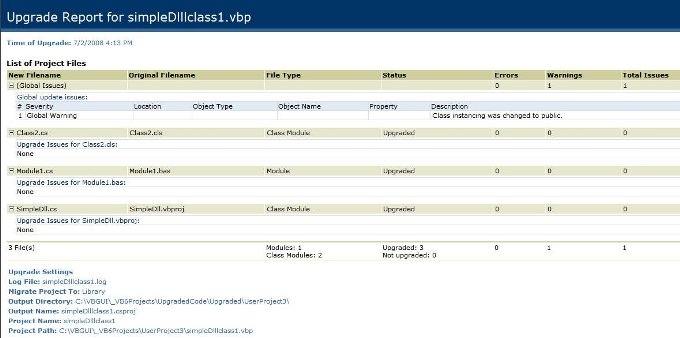
The upgrade process will produce one Upgrade Report HTML file for each upgraded project. The Upgrade Report contains information about issues that might need to be manually resolved before the upgraded project can be compiled and executed properly.
4. Resolve Warnings
5. Start the Automated Upgrade
6. VB6 AI Migrator - Command Line Interface
VB6 AI Migrator Quick Start



