

VELO Platform
Pre-releaseSign in, upload your code, assess and modernize it yourself.
- Visual Basic 6
- PowerBuilder
- Microsoft Access


 Agentic AI For Legacy Application Modernization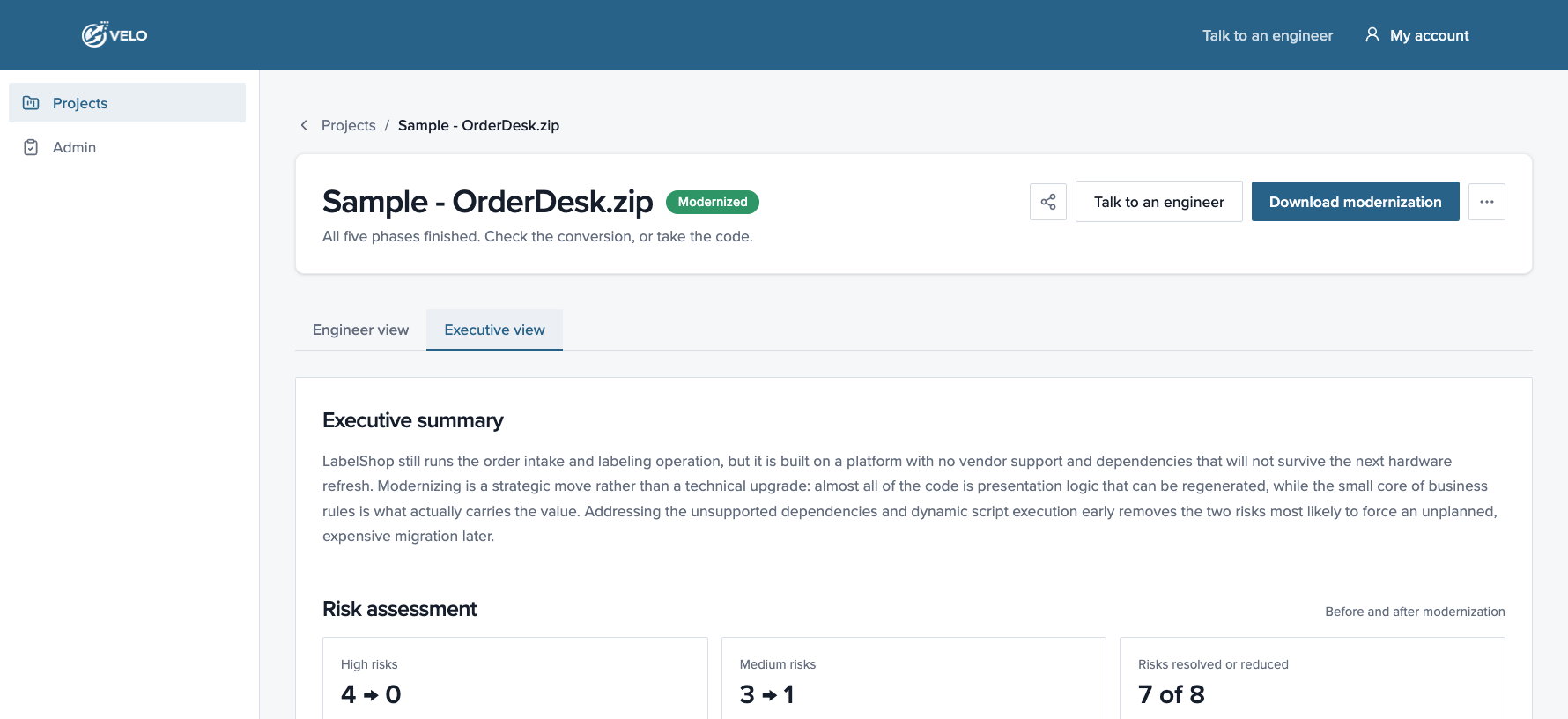
VELO is the agentic AI modernization platform built on Microsoft Foundry that transforms legacy applications into cloud native software with a fixed investment, preserving 100% of the business logic that runs your business.
Sign in, upload your code, assess and modernize it yourself.
Our team runs VELO for you, at a fixed price per stage.

Trusted by


Compare each legacy app with its Blazor output, then run both from GitHub.
Visual Basic 6 to .NET Blazor
A legacy VB6 app next to its .NET Blazor version. The repo includes the original VB6 code.
PowerBuilder to .NET Blazor
Legacy PowerBuilder screens next to the Blazor UI. The repo includes the original code.
Microsoft Access to .NET Blazor
Watch VELO modernize a Microsoft Access application to .NET Blazor.
Modernizing the application that runs your operations gives the business room to grow.
Release changes on your schedule instead of coordinating every update across one tightly coupled codebase.
How modernization enables it
Modernization breaks the monolith into a modular architecture, so teams can change and test one module without touching the entire application.
Bring AI features and agents to the applications that hold your business data and logic.
How modernization enables it
Modern .NET code gives you a supported foundation to build and maintain AI infrastructure and agents, which legacy runtimes were never designed for.
Add capacity on demand and give distributed teams browser access without per-machine installs.
How modernization enables it
Modernization replaces thick-client desktop apps with web applications that run on Azure App Service and Azure SQL or on-premises, with some manual effort.
Remove the single points of failure that leave a business-critical application one OS update or key retirement away from an outage.
How modernization enables it
Modernization retires end-of-life runtimes and unsupported 32-bit COM and ActiveX components, and moves the application to supported .NET.
Staff the application from the mainstream talent market instead of a shrinking pool of legacy specialists.
How modernization enables it
Modernization moves the codebase to C# and .NET, a mainstream enterprise stack with a large developer community and modern tooling.
Show auditors and customers an application built on supported, regularly patched technology.
How modernization enables it
Modernization moves the application to a platform that receives regular security updates and can integrate with Microsoft Entra ID for SSO and MFA, with some manual effort.
General-purpose AI coding tools handle the straightforward 70% of a legacy codebase, then stall. The last 30% needs context across the whole application, and that is where the hardest problems live.
Logic embedded in forms and event handlers, with no documentation to recover it from.
Shared modules, data access and COM components that file-by-file tools cannot trace.
Schema semantics and form-level behavior that syntax translation leaves behind.
VELO maps the entire application before AI touches a line of code.
Dependency mapping, schema extraction and logic identification across the full codebase produce a complete modernization plan.
Language-specific agents convert small, pre-mapped chunks of code and validate the output against the original source, which limits variance.
| Capability | Manual rewrite | General AI | VELO agents |
|---|---|---|---|
| Understands legacy schema semantics | Yes | No | Yes |
| Generates compilable code | Yes | Sometimes | Yes |
| Automated test generation | No | Sometimes | Yes |
| Time to engineering-ready code | Months | Unpredictable | Weeks |
| Investment vs. a manual rewrite | Baseline | Variable | 60% less |
A fixed price and defined outcome at each stage.
Agents validate against the original source, so you see what carried forward.
Dependency-aware planning across large applications.
Available for Visual Basic 6, PowerBuilder and Microsoft Access.
With your approved account
Upload your source securely
Review your modernization plan
Unlock it for your codebase
Agents convert to .NET Blazor
Compare new and original code
Managed service
WinForms, WebForms, Clarion or Delphi? Our team runs the modernization for you, at a fixed price per stage.
A sample report from a VB6 codebase: inventory, complexity, risks, timeline and automation coverage.
Sample data · nothing from your machine is scanned yet
Source and target technologies
Visual Basic 6
Source technology
.NET / Blazor
Target technology
Indicative, based on the scanned code
2 to 5 weeks
Timeline
65% automation coverage
35% needs manual attention
Size and structure
62,420
Lines of code
274
Total files
6
Projects
8
Visual components
How hard the code is to modernize
Complex
Complex, tightly-coupled application where multiple variables compound each other, significantly raising analysis effort.
The codebase is 274 files across 6 projects, and roughly four fifths of the 62,420 lines sit in form code: event handlers, control layout and validation that the generator can reproduce directly against Blazor components. The parts that need your attention are narrower: business rules embedded in form modules rather than a service layer, ADO recordsets opened inline against SQL Server 2012, and unsupported controls (MSCOMCTL.OCX, Crystal Reports 8.5) with no drop-in equivalent. Dynamic script execution and late-bound COM calls cannot be resolved statically, so they are flagged for manual review instead of conversion. Use the tabs below to trace each finding back to the file and line it came from.
274 files scanned across the codebase.
Identified extensions are associated to technology groups.
| Technology | Lines | Files | Kilobytes |
|---|---|---|---|
| Visual Basic 6 | 62,420 | 234 | 4,497 |
| Classic ASP / VBScript | 6,180 | 27 | 512 |
| SQL scripts | 1,940 | 13 | 184 |
File count by extension, grouped by technology.
| Technology | Description | Total files |
|---|---|---|
| Technology | 91 | |
| bas | Visual Basic Module file | 5 |
| frm | Visual Basic Form file | 84 |
| vbp | Visual Basic Project file | 1 |
| vbw | Visual Basic Workspace file | 1 |
| Other Extensions | 19 | |
| txt | Plain text file | 9 |
| ini | Configuration settings file | 6 |
| log | Application log file | 4 |
| Binary Extensions | 164 | |
| ocx | ActiveX control | 62 |
| dll | Dynamic link library | 48 |
| frx | Visual Basic form binary resource | 41 |
| ico | Icon image file | 13 |
Supported and total lines, by technology and type.
Supported ELOC:
Total Lines (With unsupported LOC):
| Type | File count | VB6 code | VB6 design | VBScript | HTML code | JavaScript | Comments | Blanks |
|---|---|---|---|---|---|---|---|---|
| ASP File | 0 | 0 | 0 | 0 | 0 | 0 | 0 | 0 |
| VB6 File | 87 | 12,705 | 61,214 | 0 | 0 | 0 | 2,722 | 2,226 |
| Total Supported | 87 | 12,705 | 61,214 | 0 | 0 | 0 | 2,722 | 2,226 |
| Total Unsupported | 30 | 183 | 35,413 | 0 | 0 | 0 | 1 | 27 |
| Total | 117 | 12,888 | 96,627 | 0 | 0 | 0 | 2,723 | 2,253 |
Project files discovered in the codebase.
Total projects
1
VB6 projects
1
ASP projects
0
Unassigned files
19
| Project | Technology | Type | Files | Lines | Size |
|---|---|---|---|---|---|
| LegacyApp.vbp | Visual Basic 6 | Standard EXE | 91 | 67,542 | 2,396 KB |
| Member type | Files | Lines |
|---|---|---|
| Forms (.frm) | 84 | 61,814 |
| Modules (.bas) | 5 | 311 |
| Designers (.dsr) | 31 | n/a |
| Project files (.vbp/.vbw) | 2 | 295 |
| Group | Files | Note |
|---|---|---|
| Unassigned / loose files | 19 | Not referenced by any project file |
| Shared binaries (.dll/.ocx/.tlb) | 5 | Referenced at runtime, outside project scope |
Visual components found on forms, and how they map to a modern UI.
Visual components
2,170
Distinct control types
24
Forms with controls
84
Third-party controls
312
| Control | Origin | Instances | Migration path |
|---|---|---|---|
| Label | Intrinsic | 612 | Direct mapping |
| TextBox | Intrinsic | 438 | Direct mapping |
| CommandButton | Intrinsic | 301 | Direct mapping |
| Frame | Intrinsic | 184 | Direct mapping |
| ComboBox | Intrinsic | 146 | Direct mapping |
| MSFlexGrid | Third-party (OCX) | 97 | Needs replacement |
| DataGrid | Third-party (OCX) | 88 | Needs replacement |
| CheckBox | Intrinsic | 76 | Direct mapping |
| ImageList / Toolbar | Third-party (OCX) | 127 | Needs replacement |
| CrystalReport control | Third-party (OCX) | 101 | Manual redesign |
Sorted by conversion effort.
| Component | Type | Lines | Dependencies | Complexity | Risk |
|---|---|---|---|---|---|
| frmOrderIntake | Form | 4,820 | 14 | 62 | High |
| modPricingRules | Module | 2,640 | 9 | 74 | High |
| modTaxEngine | Module | 1,480 | 6 | 68 | High |
| frmLabelDesigner | Form | 3,910 | 11 | 48 | Medium |
| clsPrinterBridge | Class | 640 | 4 | 41 | High |
| modDbAccess | Module | 1,960 | 8 | 37 | Medium |
| clsOrder | Class | 1,130 | 7 | 29 | Medium |
| modUtils | Module | 720 | 2 | 11 | None |
Third-party runtimes the legacy app relies on.
| Dependency | Version | Type | Status |
|---|---|---|---|
| Crystal Reports Runtime | 8.5 | ActiveX | End of life |
| Zebra ZPL Bridge | 2.1 | COM DLL | Unsupported, 32-bit only |
| Microsoft ADO | 2.8 | COM | Deprecated |
| MSCOMCTL.OCX | 6.1 | ActiveX | Legacy, patched |
| SQL Server | 2012 | Database | Out of support |
Every callable surface found in the codebase.
Total signatures
2,170
Public
612
Private
1,558
Modules covered
91
Signatures by kind
Signatures by module type
| Module type | Signatures | Share |
|---|---|---|
| Form (.frm) | 1,684 | 78% |
| Module (.bas) | 402 | 18% |
| Designer (.dsr) | 84 | 4% |
Module-level detail for every exposed routine.
| Module | Signature | Kind | Visibility | Params | Returns | Calls |
|---|---|---|---|---|---|---|
| modPricing.bas | CalculateNetPrice | Function | Public | 4 | Currency | 138 |
| modTax.bas | ApplyTaxRules | Function | Public | 3 | Currency | 96 |
| modGlobal.bas | InitApplication | Sub | Public | 0 | n/a | 12 |
| frmInvoice.frm | cmdSave_Click | Event handler | Private | 0 | n/a | 1 |
| frmInvoice.frm | LoadInvoiceLines | Sub | Private | 1 | n/a | 24 |
| frmCustomer.frm | ValidateCustomer | Function | Private | 2 | Boolean | 41 |
| frmCustomer.frm | Form_Load | Event handler | Private | 0 | n/a | 1 |
| frmMain.frm | OpenModule | Sub | Public | 2 | n/a | 63 |
| frmMain.frm | CurrentUser | Property | Public | 0 | String | 87 |
| frmReports.frm | BuildAgingReport | Function | Public | 3 | Recordset | 19 |
| modGlobal.bas | LogError | Sub | Public | 2 | n/a | 204 |
| DataEnv.dsr | GetConnection | Function | Public | 1 | Connection | 152 |
LabelShop still runs the order intake and labeling operation, but it is built on a platform with no vendor support and dependencies that will not survive the next hardware refresh. Modernizing is a strategic move rather than a technical upgrade: almost all of the code is presentation logic that can be regenerated, while the small core of business rules is what actually carries the value. Addressing the unsupported dependencies and dynamic script execution early removes the two risks most likely to force an unplanned, expensive modernization later.
| Factor | Criticality | Business impact |
|---|---|---|
| Complex UI Control Density | Medium | Every form change risks breaking unrelated behaviour, so small updates keep needing full regression testing |
| External Dependency Risk | High | Three unsupported components stay in production with no vendor fixes; a Windows update can take the app down with no supported path back |
| Unused Library References | Medium | Eleven dead references keep inflating build and audit work, and each still has to be reviewed whenever compliance asks |
| Dynamic Script Execution via MSScriptControl | High | User-editable script keeps running unchecked at runtime, and the 32-bit control blocks any move to 64-bit Windows |
| Security Exposure | High | Credentials sit in plain text in configuration and connection strings, leaving customer and order data reachable by anyone with file access |
| Compliance Risk | High | No audit trail of who changed what, so the application cannot evidence controls during a SOC 2 or data-protection audit |
| Competitive Cost of Delay | Medium | New features take months because every change runs through form code, so the business cannot match faster-moving competitors |
| Documentation Gaps | Low | Some behaviour is only known to long-serving staff, slowing down validation of converted logic |
| Driver | Impact | Detail |
|---|---|---|
| Volume of code | High | 62,420 lines across 274 files |
| Unsupported interop | High | Two COM/ActiveX components need replacement |
| Business-rule density | Medium | Pricing and tax logic requires SME validation |
| Automation coverage | Reduces cost | 65% of the code is machine-convertible |
| Documentation gaps | Medium | Partial docs; some tribal knowledge involved |
See exactly where your codebase stands before you scope the work
What changes for the people who build, run and use it.
| Area | Legacy application | Modernized with VELO |
|---|---|---|
| Platform | Runtimes with little or no vendor support | .NET and Blazor Server, actively updated |
| Architecture | Business logic tied to forms and event handlers | Modular, extendable one piece at a time |
| Access | Desktop clients on every Windows machine | A web app in the browser |
| Identity | Logins managed inside the app | Microsoft Entra ID integration* |
| Hosting | On-premises servers and 32-bit components | Azure App Service and Azure SQL, or your own servers* |
| Team | A shrinking pool of specialists | C# and .NET, with a large developer community |
| AI | No practical path to AI | A baseline for AI infrastructure and agents |
* Azure and Entra ID integrations may need some manual effort.
How we handle your code, and what your application gains.
How we handle your code
SOC 2 Type I audited.
No customer code is used to train shared models.
We scan your code, then delete it. Nothing stored.
Encrypted in transit and at rest.
Every result traces back to your own file and line.
A real person checks every output.
What your modernized application gains
.NET receives regular security updates from Microsoft.
Single sign-on and MFA through Microsoft Entra ID, with some manual effort.
The assessment flags hard-coded credentials and out-of-support databases.
Adopt Azure security services and monitoring as they evolve.
Visual Basic 6, PowerBuilder, Microsoft Access, WinForms, WebForms, Clarion and Delphi, all to .NET Blazor.
Visual Basic 6, PowerBuilder and Microsoft Access. WinForms, WebForms, Clarion and Delphi are modernized as a managed service.
Request access through the form at the top of this page. Once approved, you get a login to the VELO platform.
Metrics on the modernization, and how the new code compares with the original against performance and security benchmarks.
Our team runs the modernization in stages: free assessment, paid POC, Beta Ready and Release Candidate. Each stage has a fixed price and a defined outcome.
Roughly 60% of VELO is deterministic planning and analysis, and 40% is agentic transformation. Agents work on small, pre-mapped chunks of code, which limits output variance.
No. VELO runs on Microsoft Foundry, and no customer code is used to train shared models.
Turn your legacy codebase into a modern Blazor and Azure application.
