



by Cheyenne Sokkappa, on May 15, 2026, 12:00:00 AM
This guide walks through what PowerBuilder modernization actually looks like today, what the options are, and how Agentic AI platforms like VELO are making automated conversion a realistic alternative to manual rewrites.
If you've ever inherited a PowerBuilder app, you already know the modernization options on paper. The question is whether automated conversion in 2026 has actually closed the gap to something you'd ship. The honest answer: for ~80–90% of a typical codebase, yes. For the rest, no, and it's worth being specific about which parts.
Why PowerBuilder modernization is urgent now
PowerBuilder applications have survived this long because they work. The business logic is sound, users know the workflows, and the applications handle real operational load. But the platform itself is creating compounding problems:
Citrix costs are forcing the conversation. For decades, PowerBuilder shops relied on Citrix XenApp and Virtual Apps to deliver desktop applications to remote users and branch offices. That delivery model just got expensive. Citrix's recent licensing change raised prices by 100%, perpetual licenses are being phased out in favor of subscription-only pricing, and monthly options now cost up to twice as much as annual commitments. Every renewal cycle you wait is another year of paying double for a legacy delivery model. Modernizing to a Blazor application removes the Citrix line item from your budget entirely.
The talent gap is real. PowerBuilder developers are retiring. Finding new ones is increasingly difficult and expensive. Every year that passes makes your application harder to maintain, extend, and support.
Security and compliance requirements keep tightening. Desktop client-server architectures don't meet modern security standards. SOC 2, HIPAA, and industry-specific compliance frameworks increasingly require web-based architectures with centralized authentication, audit logging, and encrypted data in transit.
Cloud migration is blocked. You can't deploy a PowerBuilder application to Azure, AWS, or GCP in any meaningful way. That means you're locked out of cloud infrastructure, autoscaling, managed databases, and the broader ecosystem of services that modern applications depend on.
Integration is painful. Modern systems expect REST APIs, webhooks, and standard authentication protocols. PowerBuilder's COM-based and DDE integration model makes connecting to new systems progressively harder.
The question isn't whether to modernize. It's how to do it without spending 18 months and a large budget on a rewrite that may not preserve the business logic your organization depends on.
A real conversion: DataWindows to Blazor
Here's a simplified but representative DataWindows definition for a customer list with filtering, computed columns, and validation. This is roughly what d_customer_list.srd looks like when exported:
.png?width=2048&height=1860&name=carbon%20(1).png)
There's a lot happening in that single object: a parameterized SQL query, four bound columns with type information, a computed field expression, conditional protection logic, format strings, and an inline validation rule. In PowerBuilder this is one file. In any modern framework it becomes at least four concerns that have to be separated.
Here's the Blazor equivalent the conversion produces:
Data model (Customer.cs):
.png?width=1582&height=1004&name=carbon%20(2).png)
Repository (CustomerRepository.cs) — replaces the embedded SQL with parameterized EF Core:
.png?width=2048&height=894&name=carbon%20(3).png)
Blazor component (CustomerList.razor) — the UI layer:
.png?width=1766&height=1302&name=carbon%20(4).png)
A few things worth pointing out about this conversion:
The DataWindow's single concern has fanned out into three files because Blazor enforces a separation PowerBuilder doesn't. That's the point — it's what makes the result testable, maintainable, and deployable as a web app. But it also means the line count goes up, and developers reviewing the output should expect that.
The validation rule (credit_limit <= 999999) maps cleanly to a [Range] data annotation. The computed field (if(credit_limit > 50000, 'PREMIUM', 'STANDARD')) maps cleanly to a C# expression-bodied property. These are deterministic transformations — a rule-based converter handles them with no AI involved, no chance of hallucination.
The protection expression (1~tif( credit_limit > 100000, 1, 0)) is where it gets interesting. That tilde-t syntax is a PowerBuilder-specific expression evaluator. A deterministic rule can recognize the pattern and emit IsCreditLimitReadOnly, but only because someone wrote that rule. A general-purpose LLM with no PowerBuilder-specific training will often get this wrong; either misreading the escape sequence or generating a runtime check that doesn't fire at the right point in the binding lifecycle.
What automated conversion handles well, and what it doesn't
Here's a more honest breakdown than the usual "up to 95% automated" line:
Handled deterministically (no AI judgment needed):
- PowerScript syntax → C# (variable declarations, control flow, function signatures)
- Standard DataWindow column types and bindings
- Embedded SQL with static WHERE clauses → EF Core LINQ
- Built-in PowerBuilder function calls with direct .NET equivalents
- Standard UI controls (CommandButton, SingleLineEdit, etc.) → Blazor components
Handled with AI assistance (context-dependent):
- Dynamic SQL with runtime-constructed WHERE clauses
- Complex DataWindow expressions involving multiple columns
- Event chains where state is implicitly shared via instance variables
- PFC (PowerBuilder Foundation Class) inheritance unwinding
Still requires manual work:
- Custom user objects with no obvious framework equivalent
- Third-party PBX/DLL integrations
- DDE and OLE automation calls (often need to be redesigned, not translated)
- DataWindow features with no Blazor analog (e.g., crosstab presentations with runtime pivoting)
- Cursor-based row-by-row SQL that should be rewritten as set-based queries
- Anything that depends on PowerBuilder's specific event firing order
That last category is the one that bites. PowerBuilder fires events in a specific sequence (itemchanged before itemfocuschanged, losefocus after validation, etc.), and applications often have logic that implicitly depends on this order. Blazor's component lifecycle is different. A converted app can compile, run, and look correct, and still misbehave because an event that used to fire before a save now fires after. This is the kind of thing only behavioral testing catches — automated conversion tools don't.
A realistic expectation: automated tooling handles 80–90% of a typical PowerBuilder codebase by line count. The remaining 10–20% is where the modernization project actually lives, and any vendor telling you otherwise is selling.
Why Blazor?
While we do target Blazor, VELO is target-agnostic. We can target React or Angular or any specific technology you would prefer. We simply choose to target Blazor rather than React or Angular because it makes the conversion structurally simpler, not just stylistically preferable. Blazor is also C# on the front and backend, so it may be easier for your team if they are familiar with C#. Blazor is native to the Microsoft Ecosystem and Azure if that is the cloud provider you are choosing.
PowerScript and C# are close enough syntactically that converted business logic looks like idiomatic C# rather than translated code. A PowerBuilder developer reading the output recognizes it. That matters for the team that has to maintain it after handoff.
Blazor's component model maps to PowerBuilder windows more directly. A window with embedded DataWindows becomes a page with grid components; a user object becomes a Razor component. The conversion doesn't have to invent a different mental model.
Data binding semantics are similar enough that DataWindow update behavior (the updatewhereclause=yes flag, optimistic concurrency via the original-value comparison) has a natural EF Core equivalent. Translating to a framework with a different data-binding philosophy means rewriting more of this by hand.
If your team is on Java, the same logic applies to Angular or Vaadin, but the C#/Blazor path is shorter for most PowerBuilder shops.
The role of Azure and Microsoft Foundry
VELO runs on Microsoft Azure AI Foundry, and this matters beyond just being a hosting choice.
Enterprise security model. Your source code is processed within a dedicated Azure environment. It's never used to train AI models, never shared across engagements, and permanently deleted upon project completion. Azure's regional infrastructure means data residency requirements can be accommodated for regulated industries.
Purpose-built AI orchestration. Microsoft Foundry provides the infrastructure for VELO's agent pipeline. Each specialized agent (Scout, Architect, Translation, Quality) runs as a managed service with the compute resources appropriate for its task. The platform handles model selection, scaling, and orchestration so the modernization team doesn't need to manage AI infrastructure.
Post-modernization ecosystem. Once your PowerBuilder application is running as a Blazor app on Azure, you have access to the full Microsoft cloud ecosystem: Azure SQL for managed databases, Azure DevOps for CI/CD pipelines, Application Insights for monitoring, Azure AD for authentication, and Azure AI services for adding intelligent features to the modernized application.
Azure consumption credits apply. For organizations with existing Microsoft Enterprise Agreements or Azure commitments, VELO engagements can be structured to apply against Azure consumption commitments (ECIF credits). This can significantly reduce the effective cost of modernization.
What the modernization process actually looks like
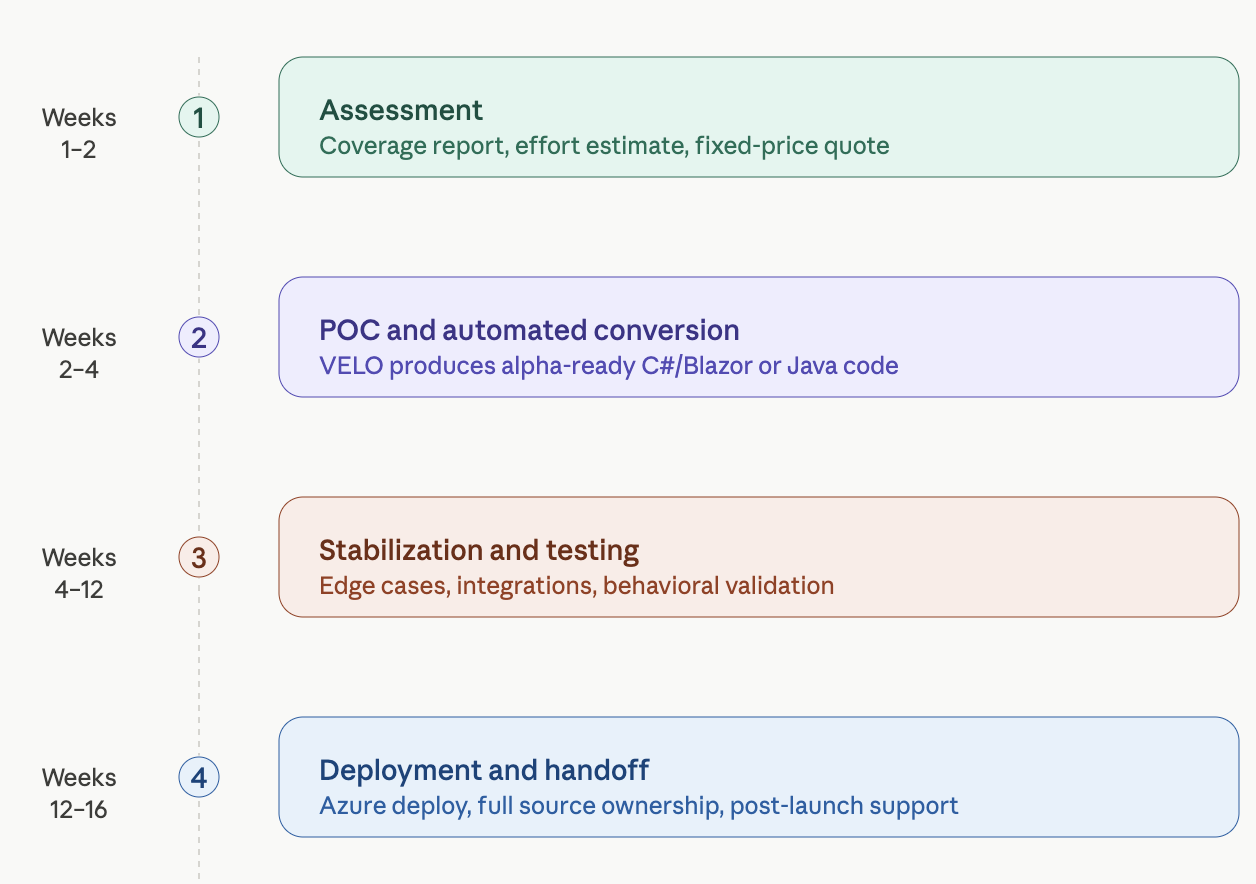
Here's the typical timeline and sequence for a mid-sized PowerBuilder application (100K-500K lines of code):
Weeks 1-2: Assessment. You run your PowerBuilder codebase through ByteInsight, GAPVelocity AI's free assessment tool, or send it to the team for analysis. The output is a detailed scope report showing automation coverage percentage, estimated effort for the remaining manual work, and a fixed-price quote. This is the decision point: you know exactly what the modernization involves before committing.
Weeks 2-4: POC and Automated conversion. For applicable large projects, we will run a POC via a Forward Deployed Engineer to determine that validity of VELO for the project. Once the POC is complete and the modernization agreement is in place, the VELO platform runs the conversion. The automated portion (up to 95%) typically completes in hours to a few days, depending on codebase size. The output is compilable, alpha-ready C#/Blazor or Java code.
Weeks 4-12: Stabilization and testing. The remaining 5-15% requires manual modernization: custom controls that don't have direct Blazor equivalents, third-party integrations that need rewiring, edge cases in DataWindow behavior, and functional testing to validate that the modernized application behaves like the original. Your team can handle this phase, or GAPVelocity AI's AI Squad can complete it at an additional fixed price.
Weeks 12-16: Deployment and handoff. The modernized application is deployed to your Azure environment. Your team receives the full source code with no ongoing licensing fees. Post-deployment support is included in the engagement.
Total timeline for a mid-sized application: 8-16 weeks. Compare that to 12-24 months for a typical manual rewrite.
What to do right now
If you're considering modernizing a PowerBuilder application, the single best first step is running an assessment. ByteInsight analyzes your PowerBuilder codebase and gives you concrete data on what the modernization involves: how much VELO can automate, what remains for manual work, and what the timeline and cost look like.
The assessment is free, and you don't need to commit to anything to run it. If the numbers make sense, you move forward. If they don't, you have a detailed scope document you can use however you want.

You can also explore these resources:
- PowerBuilder modernization page for a technical overview of the conversion process
- Case studies from enterprise PowerBuilder modernization projects
- VELO documentation for details on the agentic AI platform
Or reply to talk to an engineer about your specific application. We've converted over 5 million lines of PowerBuilder code and can give you a direct answer on what your modernization would look like.

