



by Cheyenne Sokkappa, on Jan 25, 2026, 12:00:01 AM
A comprehensive guide to choosing the right Azure hosting platform for your Blazor application
Choosing the right hosting platform for your Blazor application isn't just a technical decision, there are direct impacts to your application's performance, reliability, and cost. In 2026, Blazor matured into a fully production-ready web framework capable of powering everything from internal dashboards to public-facing SaaS platforms. With this maturity comes the responsibility of making informed cloud hosting decisions.
Azure offers several compelling options for hosting Blazor applications, each optimized for different scenarios. The four primary contenders are Azure App Service, Azure Static Web Apps, Azure Container Apps, and Azure Kubernetes Service (AKS). Your choice between them depends largely on which Blazor hosting model you're using, your scale requirements, your team's expertise, and your budget constraints.
By the end of this guide, you'll understand when to use each platform, how to evaluate trade-offs between cost and capability, and how to match your specific Blazor scenario to the optimal Azure hosting solution.
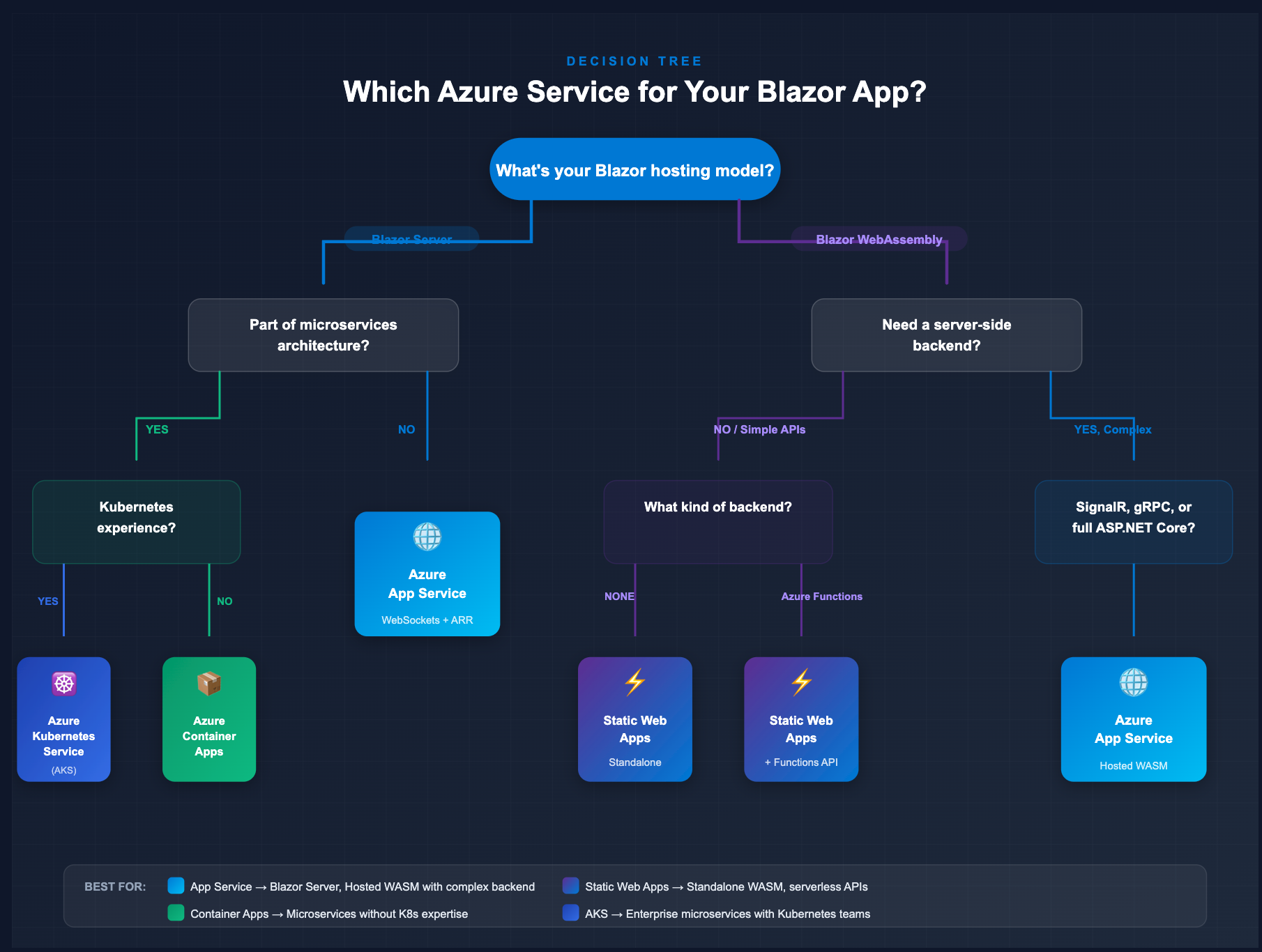
Blazor Hosting Models in Plain English
Before diving into Azure hosting options, let's establish a clear understanding of Blazor's hosting models. This context is essential because there isn't a "one best" Azure service. Your model choice strongly influences your hosting choice.
1. Blazor Server
Blazor Server runs your application on the server, with UI updates transmitted to the browser over a persistent SignalR WebSocket connection. Every button click, form submission, or interactive event travels to the server, gets processed, and the resulting DOM changes are pushed back to the client.
Key characteristics:
- Requires a persistent real-time connection to the server
- Application state lives on the server
- Minimal download size (no .NET runtime sent to browser)
- Requires session affinity (sticky sessions) for multi-instance deployments
- Latency-sensitive—best when users are geographically close to the server
Best for: Line-of-business applications, admin dashboards, internal tools where users have reliable network connections.
2. Blazor WebAssembly (WASM)
Blazor WebAssembly downloads the .NET runtime and your application assemblies directly to the browser, where everything executes client-side. After the initial download, the application runs independently without requiring a constant server connection.
Key characteristics:
- Larger initial download (runtime + application assemblies)
- Runs entirely in the browser after loading
- Can work offline once cached
- No persistent server connection required for UI interactions
- Can be "standalone" (static files only) or "hosted" (with an ASP.NET Core backend)
Best for: Public-facing applications, progressive web apps (PWAs), scenarios requiring offline capability, applications where you want to offload compute to the client.
3. Blazor Hybrid (MAUI)
Blazor Hybrid embeds Blazor components inside native applications built with .NET MAUI. The Blazor UI runs locally within the native app wrapper rather than in a browser.
Key characteristics:
- Runs as a native desktop or mobile application
- No web server required for the UI layer
- Full access to native platform capabilities
Note: Since Blazor Hybrid apps run natively on devices, they typically don't require Azure hosting for the UI itself. However, they often connect to cloud APIs and services. We'll focus primarily on Server and WebAssembly for this hosting comparison.
Azure App Service: The Default Workhorse for Blazor Server
Azure App Service is Microsoft's flagship platform-as-a-service (PaaS) for web applications. It provides managed web hosting with built-in CI/CD, automatic scaling, custom domains, and SSL certificates without the complexity of managing virtual machines.
What App Service Excels At
Managed infrastructure: App Service handles OS patching, load balancing, and health monitoring. You deploy your code; Azure handles the rest.
WebSocket support: Critical for Blazor Server, App Service fully supports WebSockets with proper configuration. This enables the low-latency SignalR connections that Blazor Server requires.
Session affinity (ARR): Application Request Routing can pin users to specific instances, ensuring their circuit state remains consistent—essential for Blazor Server in multi-instance deployments.
Integrated diagnostics: Application Insights integration provides detailed telemetry, exception tracking, and performance monitoring out of the box.
Flexible scaling: Scale up (bigger instances) or scale out (more instances) with simple configuration changes or auto-scale rules.
Officially documented path: Microsoft's Blazor documentation explicitly covers App Service deployment, including WebSocket configuration and ARR affinity settings.
When App Service Is the Best Choice
App Service should be your default choice for Blazor Server applications in most scenarios:
- Interactive LOB applications: Dashboards, admin panels, data entry systems with 50–5,000+ concurrent users
- Traditional ASP.NET Core backends: When you need both Blazor Server UI and Web API endpoints in a single deployment
- Hosted Blazor WebAssembly: When your WASM frontend needs an integrated ASP.NET Core backend (authentication, data APIs)
- Teams prioritizing simplicity: When you want managed infrastructure without container expertise
- Scenarios requiring advanced diagnostics: When detailed server-side telemetry is important
Critical configuration for Blazor Server on App Service:
- Enable WebSockets: Navigate to Configuration → General settings → Set Web sockets to "On"
- Verify Session Affinity: Ensure ARR Affinity is set to "On" (default for most plans)
- Consider Azure SignalR Service: For high-scale scenarios (thousands of concurrent users), offload SignalR connections to the managed Azure SignalR Service
Example Scenario: Internal Operations Dashboard
Situation: Your company needs an internal dashboard for operations teams to monitor real-time logistics, inventory levels, and order processing. Users are primarily office-based with reliable network connections.
Solution:
- Hosting model: Blazor Server
- Azure service: App Service (Standard S1 or Premium P1v3)
- Configuration: WebSockets enabled, ARR affinity on, Application Insights for server-side telemetry
- Why it works: The real-time nature of operations monitoring benefits from Blazor Server's instant interactivity. App Service's managed infrastructure lets your team focus on business logic rather than server management.
Azure Static Web Apps: The Best Default for Blazor WebAssembly
Azure Static Web Apps (SWA) is purpose-built for static frontends paired with serverless backends. It provides global edge distribution, automatic SSL, built-in CI/CD from GitHub or Azure DevOps, and a generous free tier.
What Static Web Apps Offers
Global edge distribution: Your Blazor WASM assets are distributed to edge locations worldwide, ensuring fast initial loads regardless of user location.
Built-in CI/CD: Connect your GitHub or Azure DevOps repository, and Static Web Apps automatically builds and deploys on every push.
Serverless backend integration: Azure Functions can serve as your API backend, running at consumption pricing (pay only for what you use).
Free SSL and custom domains: Even the free tier includes automatic SSL certificates and support for custom domains.
First-class Blazor support: Microsoft provides official templates, documentation, and build presets specifically for Blazor WebAssembly.
Cost efficiency: The free tier is suitable for many small-to-medium applications; the Standard tier ($9/month) covers most production needs.
When Static Web Apps Is the Best Choice
Static Web Apps should be your first choice for Blazor WebAssembly applications in these scenarios:
- Standalone Blazor WASM: Your frontend doesn't require a hosted ASP.NET Core backend
- Serverless API backends: Azure Functions (HTTP triggers) handle your data access needs
- Public-facing applications: Marketing sites, product catalogs, documentation portals
- Cost-sensitive projects: Startups, MVPs, or projects where hosting cost matters
- Global audiences: Users distributed across multiple regions benefit from edge caching
Why not App Service for WASM?
While you can deploy standalone Blazor WASM to App Service, you're paying for always-on compute to serve static files. Static Web Apps provides better global performance at a fraction of the cost for purely static frontends.
Example Scenario: Customer-Facing Product Catalog
Situation: Your e-commerce company needs a product catalog that loads quickly for customers worldwide. The catalog data comes from an existing Cosmos DB database.
Solution:
- Hosting model: Blazor WebAssembly (standalone)
- Azure service: Static Web Apps (Standard tier)
- Backend: Azure Functions for API endpoints, connected to Cosmos DB
- CI/CD: GitHub Actions (automatically configured by Static Web Apps)
- Why it works: Global edge caching ensures fast load times for product pages. Serverless Functions scale automatically during traffic spikes. Total hosting cost remains predictable and low.
Azure Container Apps and AKS: When You Actually Need Containers
Containers aren't always the answer, but when your architecture genuinely requires them, Azure provides two excellent options: Container Apps for serverless container experiences, and AKS for full Kubernetes control.
Why Containers for Blazor?
Before reaching for containers, ask yourself: "Does my application actually require containerization?" Valid reasons include:
- Microservices architecture: Your Blazor frontend is one service among many
- Polyglot stacks: Your system includes services written in multiple languages/frameworks
- Custom runtime requirements: You need specific OS dependencies or configurations
- Advanced networking: Complex service mesh, ingress rules, or network policies
- Existing Kubernetes expertise: Your team already operates in a container-native world
- Regulatory requirements: Specific isolation or compliance needs
Don't default to containers for every Blazor app. If App Service or Static Web Apps meet your needs, the additional complexity of container orchestration provides no benefit.
Azure Container Apps
Azure Container Apps offers a serverless container platform with automatic scaling, Dapr integration, and per-second billing. It's Kubernetes under the hood, but abstracted away so you focus on containers rather than cluster management.
Key capabilities:
- Scale to zero: Non-UI services (background workers, APIs) can scale down to zero replicas when idle, reducing costs
- Dapr integration: Built-in support for the Distributed Application Runtime simplifies service-to-service communication, state management, and pub/sub
- KEDA-based autoscaling: Scale based on HTTP traffic, queue depth, or custom metrics
- Revision management: Deploy new versions with traffic splitting for blue-green or canary deployments
- Session affinity: Supported for Blazor Server workloads requiring sticky sessions
When to choose Container Apps:
- You need containerization but don't want to manage Kubernetes clusters
- Your architecture includes event-driven or background processing workloads
- You want scale-to-zero for cost optimization on spiky workloads
- Your team is comfortable with containers but not deep Kubernetes operations
Blazor Server considerations:
When deploying Blazor Server to Container Apps, configure session affinity through the Azure portal or infrastructure-as-code. You'll also need to set up Azure Data Protection to persist keys (using Azure Blob Storage and Key Vault) so that Razor components deserialize correctly across container instances.
Azure Kubernetes Service (AKS)
AKS provides full Kubernetes orchestration for organizations that need (or already have) deep container expertise. It's the most powerful option but also the most complex.
Key capabilities:
- Full Kubernetes API access: Complete control over pods, services, ingress, network policies
- Enterprise governance: Integration with Azure AD, Azure Policy, and Azure Arc for multi-cluster management
- Advanced networking: Virtual network integration, custom ingress controllers, service meshes
- Long-term support: AKS Premium tier offers extended Kubernetes version support
- AKS Automatic: New simplified mode that handles cluster operations automatically while maintaining full API access
When to choose AKS:
- Large enterprises with existing Kubernetes teams and infrastructure
- Complex microservices architectures spanning dozens of services
- Specific compliance requirements mandating infrastructure control
- Multi-cloud or hybrid scenarios using consistent Kubernetes tooling
- Organizations already invested in Kubernetes ecosystem tools (Helm, ArgoCD, etc.)
Example Scenario: Multi-Service SaaS Platform
Situation: Your SaaS platform serves multiple tenants across regions. The system includes a Blazor WebAssembly frontend, multiple microservice APIs (some in .NET, some in Node.js), background processing workers, and complex routing rules.
Solution:
- Hosting model: Blazor WebAssembly (or Server for admin portals)
- Azure service: Start with Container Apps; migrate to AKS as operational needs grow
- Architecture: Each microservice runs as a separate container app; Dapr handles service-to-service communication
- Why this approach: Container Apps provides the container benefits without Kubernetes operational overhead. As your team's expertise grows and you need finer-grained control, transitioning to AKS becomes straightforward since both run on Kubernetes foundations.
Cost and Performance Comparison
Understanding cost patterns helps you make informed decisions without overspending on capabilities you don't need.
Approximate Cost Patterns
Note: These are illustrative patterns, not exact pricing. Always verify current pricing on Azure's pricing calculator. These will vary by region and usage.
|
Service |
Entry Point |
Production Estimate |
Best For |
|
Static Web Apps Free |
$0/month |
$0/month (100GB bandwidth) |
Personal projects, MVPs |
|
Static Web Apps Standard |
~$9/month |
~$9/month + overage |
Production WASM apps |
|
App Service Basic B1 |
~$13/month (Linux) |
N/A (dev/test only) |
Development, testing |
|
App Service Standard S1 |
~$70/month |
~$70-140/month |
Production Blazor Server |
|
App Service Premium P1v3 |
~$140/month |
~$140-280/month |
High-traffic Blazor Server |
|
Container Apps |
Pay-per-use |
~ ranges based on usage |
Containerized workloads |
|
AKS |
Compute + mgmt fee (at least a few hundred/month) |
~ ranges based on usage |
Enterprise microservices |
Key observations:
- Static Web Apps is dramatically cheaper for Blazor WASM frontends compared to App Service
- App Service has a higher baseline but provides always-on compute suitable for Blazor Server
- Container Apps can be cost-efficient for spiky workloads due to scale-to-zero, but requires container expertise
- AKS adds complexity costs beyond just Azure charges—factor in team time for cluster management
Performance Considerations
Static Web Apps:
- Global edge caching significantly reduces initial load times for WASM assets
- Assets served from locations geographically close to users
- Azure Functions cold starts may add latency for API calls (mitigated with Premium tier)
App Service:
- Consistent performance for Blazor Server when users are near the deployment region
- WebSocket connections have low latency for interactive UI updates
- Always-on instances eliminate cold start concerns
Container Apps:
- Cold start latency when scaling from zero replicas
- Excellent for workloads with predictable traffic patterns
- Fine-grained resource allocation (CPU/memory) enables optimization
AKS:
- Maximum control over performance tuning (node types, resource limits, affinity rules)
- Operational overhead may impact time-to-market
- Best suited when you have specific performance requirements that simpler platforms can't meet
Simple Decision Table
|
Your Scenario |
Recommended Service |
|
Blazor Server app, any scale |
App Service |
|
Blazor WASM, public-facing |
Static Web Apps |
|
Blazor WASM + ASP.NET Core backend |
App Service (hosted) |
|
Microservices, polyglot stack |
Container Apps or AKS |
|
Enterprise with Kubernetes expertise |
AKS |
|
Cost-sensitive MVP/prototype |
Static Web Apps (free tier) |
Decision Matrix: How to Choose for Your App
Use this matrix to match your application profile to the optimal Azure hosting service:
|
App Type |
Hosting Model |
Recommended Service |
Key Considerations |
|
Internal enterprise dashboard |
Blazor Server |
App Service |
WebSockets, ARR affinity, AD auth integration |
|
Public marketing site |
Blazor WASM |
Static Web Apps |
Global CDN, cost efficiency |
|
E-commerce product catalog |
Blazor WASM |
Static Web Apps + Functions |
API caching, serverless scale |
|
Real-time collaboration tool |
Blazor Server |
App Service + SignalR Service |
High concurrent connections |
|
Multi-tenant SaaS |
WASM or Server |
Container Apps / AKS |
Isolation, custom routing, multi-region |
|
Startup MVP |
Blazor WASM |
Static Web Apps (free) |
Zero cost, fast deployment |
|
Hybrid mobile companion |
Blazor WASM (PWA) |
Static Web Apps |
Offline capability, push notifications |
Decision Rules
- Building Blazor Server with enterprise authentication (AD/Entra)? → App Service. Native integration, managed SSL, easy deployment slots.
- Building a content-heavy, mostly read-only public application? → Static Web Apps. Edge caching, global distribution, minimal cost.
- Need microservices with service discovery and complex scaling rules? → Container Apps (simpler) or AKS (more control).
- Budget is the primary constraint? → Static Web Apps free tier for WASM; consider App Service Basic for Server development.
- Team has no container experience? → Avoid Container Apps/AKS until there's a genuine requirement.
Real-World Example Walkthroughs
Case Study 1: Startup Migration — App Service to Static Web Apps
Background: A startup launched their Blazor WASM product catalog on App Service because it was familiar. Monthly hosting costs were ~$70 for a Standard S1 plan.
Challenge: The application served static content with occasional API calls. The always-on compute was underutilized, and global users experienced inconsistent load times.
Migration:
- Separated the frontend (Blazor WASM) from the backend (API)
- Deployed frontend to Static Web Apps Standard ($9/month)
- Converted API to Azure Functions (consumption plan)
- Configured CI/CD from existing GitHub repository
Results:
- Hosting costs dropped from $70/month to ~$12/month
- Global page load times improved by 40% due to edge caching
- CI/CD became simpler with automated GitHub Actions
Case Study 2: Enterprise Dashboard — Scaling Blazor Server on App Service
Background: An enterprise deployed a Blazor Server admin portal on App Service. Initial deployment handled 200 concurrent users on an S1 plan.
Challenge: Company growth pushed concurrent users toward 2,000. Users reported occasional disconnections and slow UI responses.
Solution:
- Upgraded to Premium P2v3 instances (more memory for circuit state)
- Scaled out to 3 instances with ARR affinity enabled
- Added Azure SignalR Service to offload WebSocket connections
- Configured Application Insights for detailed performance monitoring
Results:
- Stable performance with 2,500+ concurrent users
- SignalR Service handled connection management efficiently
- Detailed telemetry identified and resolved slow database queries
Case Study 3: SaaS Company — Migrating to Container Apps
Background: A growing SaaS company had a monolithic Blazor Server application on App Service. As they added features, the need for background processing, event-driven workflows, and multi-language services emerged.
Challenge: The monolith became difficult to scale and deploy. Different components had different resource requirements.
Migration:
- Decomposed monolith into separate services (Blazor UI, Order API, Notification Service, Background Workers)
- Containerized each service with Docker
- Deployed to Container Apps environment with Dapr for service communication
- Configured KEDA-based autoscaling for each service independently
Results:
- Individual services scale based on their specific load patterns
- Background workers scale to zero during off-hours, reducing costs
- Development teams can deploy their services independently
- Future path to AKS remains open if Kubernetes control becomes necessary
Checklist: How to Start or Migrate
Starting Fresh: Blazor Server → App Service
- Create App Service Plan (Standard S1 or Premium P1v3 for production)
- Create Web App (Linux or Windows, .NET 9 stack)
- Configure WebSockets: Settings → Configuration → General → Web sockets: On
- Verify ARR Affinity: Should be On by default
- Deploy via: Visual Studio Publish, GitHub Actions, or Azure CLI
- Add Application Insights for monitoring
- Configure custom domain and SSL as needed
Starting Fresh: Blazor WASM → Static Web Apps
- Create Static Web Apps resource in Azure Portal
- Connect to GitHub/Azure DevOps repository
- Select "Blazor" build preset
- Configure build locations:
- App location: Client (path to your Blazor project)
- API location: Api (path to Functions project, if any)
- Output location: wwwroot
- Push code — CI/CD deploys automatically
- Configure custom domain (supports apex domains with ALIAS records)
Migrating: App Service WASM → Static Web Apps
- Identify frontend/backend split:
- If hosted WASM: Separate into standalone WASM + Azure Functions
- If already standalone: Ready to migrate
- Create Static Web Apps resource
- Configure GitHub Actions workflow (auto-generated or manual)
- Test API endpoints in Functions
- Update DNS to point to Static Web Apps URL
- Decommission App Service after validation
Migrating: Any Service → Container Apps
- Create Dockerfile for your application
- Build and test locally: docker build and docker run
- Push to Azure Container Registry (ACR)
- Create Container Apps Environment
- Create Container App with ACR image
- Configure session affinity (for Blazor Server)
- Configure data protection (Azure Blob + Key Vault for Blazor Server)
- Set up CI/CD with GitHub Actions or Azure Pipelines
Conclusion
Azure provides excellent hosting options for Blazor applications in 2026. The key is matching your specific requirements to the right platform:
- App Service remains the default choice for Blazor Server applications, offering managed infrastructure with the WebSocket support and session affinity that Blazor Server demands.
- Static Web Apps is the optimal platform for Blazor WebAssembly frontends, providing global edge distribution, integrated CI/CD, and compelling cost efficiency.
- Container Apps and AKS serve organizations with genuine containerization requirements. microservices architectures, polyglot stacks, or existing Kubernetes investments.
Don't let complexity bias drive your decisions. Start with the simplest platform that meets your needs. You can always migrate to more sophisticated hosting as your requirements evolve.

